


Key Takeaways
- YouTube impressions represent the number of times your thumbnails were shown to users during which a play was initiated, as measured by registered YouTube impressions.
- At least 50% of the thumbnail must be displayed on the screen for one second to count as an impression.
- Impressions and views aren’t the same: an impression is when the thumbnail is displayed on screen, and a view is when a user engages with it.
- A high impression count doesn’t necessarily mean YouTube is promoting the video; interpret impact rates alongside CTR, views, and watch time.
- Use YouTube Analytics to identify traffic sources and understand how impressions turn into views and watch time.
- Improving topics, titles, thumbnails, and viewer satisfaction can give your videos more opportunities to be displayed.
Understanding YouTube Impressions: The Ultimate Guide to Growing Your Reach
If you have been asking what impressions on YouTube analytics are, impressions are the times your video thumbnail has been shown to viewers on YouTube. Impressions provide creators with a sense of potential reach, while views tell you how many actual views the video got.
Who hasn’t uploaded a video to YouTube and then checked their impression stats like there’s no tomorrow? Others like you may focus only on view counts, but to better predict your video’s future performance, you need to understand YouTube impressions.
The key to predicting your video’s success is knowing how impressions work and turning them into real views. Here, you’ll learn what impressions are, why the YouTube algorithm relies on them to measure content quality, and, most importantly, how to boost your impression count.
What are YouTube Impressions?
In basic terms, YouTube records an impression each time your video thumbnail appears to someone scrolling through YouTube’s homepage. More specifically, YouTube logs a registered impression when your thumbnail is shown to a user on eligible YouTube surfaces where the user can see it for more than one second and at least 50% of the thumbnail is visible.
Although many YouTubers treat impressions and views as the same, they are different. As stated above, an impression means a potential subscriber saw the video because the title and thumbnail were displayed, while a view happens when they click it.
What Counts as an Impression?
To determine what makes an impression on YouTube, it is essential to understand how YouTube determines whether or not something is considered an impression:
- Visible: The thumbnail should be visible for at least one second on the screen.
- Size of Displayed Thumbnail: The thumbnail should take up at least 50 per cent of the screen or be at least 50% visible according to YouTube’s registered impression definition.
Where Do Impressions Appear?
Your impressions are tracked in different places on the YouTube platform, such as:
- Smartphones (Android and iPhone)
- Television Sets and Video Game Consoles
- YouTube search results
- YouTube homepage
- YouTube playlist and ‘Up Next’ suggestions
YouTube also counts registered impressions across computers, tablets, game consoles and other eligible YouTube surfaces. However, external websites and apps, YouTube’s mobile website, email notifications, YouTube Music and some other locations are not included in the registered impression metric.
How Do You Check Your YouTube Impressions?
YT impressions are not exactly the same as views.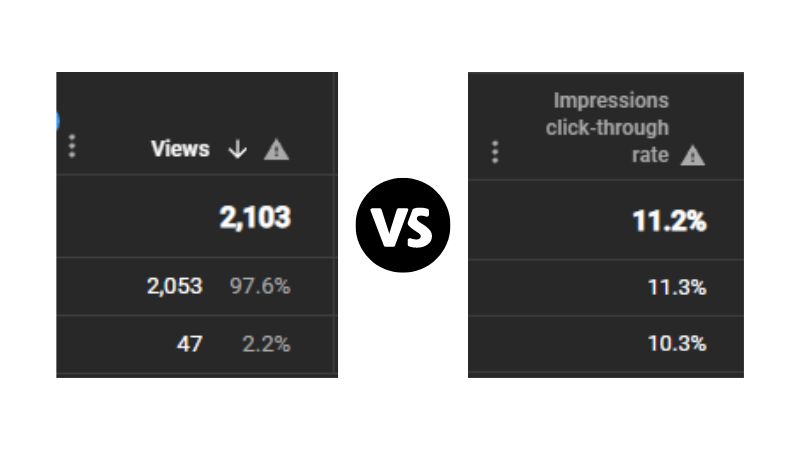 If people see your thumbnail but don’t click, it might not be working. However, a high number of impressions with a low CTR doesn’t automatically mean the thumbnail is poor. Context, audience and traffic source also matter.
In order to check the performance of the algorithm with regard to promoting your videos, you should visit YouTube Analytics. Here are some simple steps for accessing your data on impressions:
- YouTube Studio login: Visit your YouTube Studio page and log in. You will find the analytics tab on the left-hand side.
- Advanced mode access: In the top-right of the YouTube Analytics dashboard, click the button labelled ‘See more.’ This lets you view an advanced version of your metrics.
- Selecting impressions: Click on ‘Impressions’ to analyse the timeline of your video views on YouTube.
- Analysing specific videos: If you wish to analyse specific videos, you can simply click on the video in question to view its impression statistics.
As of 2026, YouTube Studio’s Analytics interface is also being updated gradually, so the exact layout may differ between accounts.
Why are YouTube Impressions Important?
The impressions indicate that your channel’s content is being shown to potential viewers. A higher impression count means your thumbnails are getting more exposure, but it doesn’t automatically mean the YouTube algorithm favours the content.
YouTube offers a preview option that lets you preview your content and an attractive thumbnail that can increase CTR. These things attract viewers. Creators should evaluate impressions alongside CTR, views, and watch time to understand whether that exposure is turning into meaningful viewing.
Analysing YouTube metrics becomes very important. You can learn what viewers are interested in and what type of videos they like. This metric helps you redefine your content strategy.
Where Can You Find Your Impressions In YouTube Studio?
YouTube Studio is where all the metrics and analytics are, so that’s the place you want to go to in order to find your impressions on YouTube. Here are the steps to find YouTube impressions:
- Open YouTube Studio and select Analytics in the left sidebar.
- Click on ‘See more’ to open the detailed analytics.
![youtube-studio-analytics]()
- In the top-right corner, select the dates you want to view impressions for.
- In the bottom half of the page, you will see Impressions in table format.
![youtube-studio-analytics-impressions]()
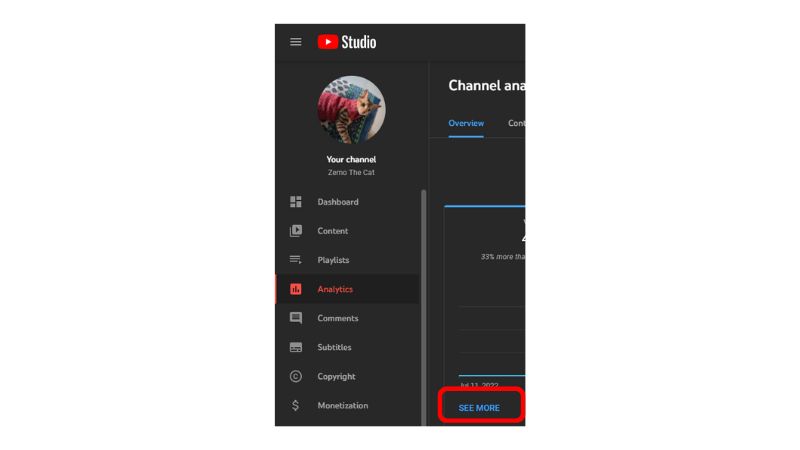
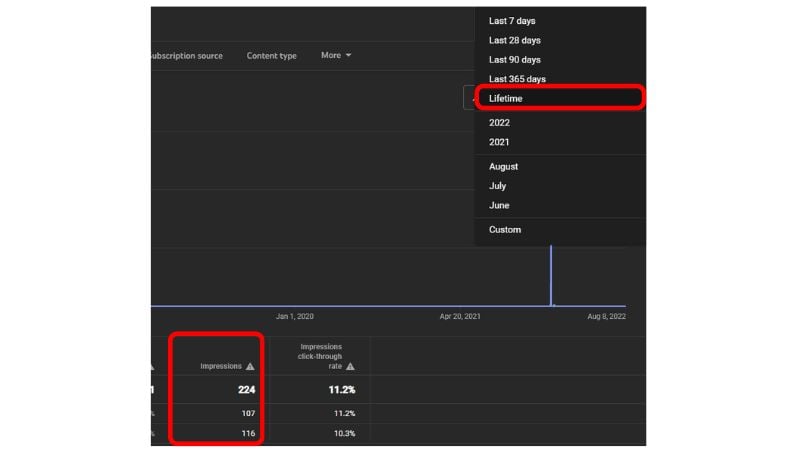
You can analyze your impressions and see the click-through rate too. These metrics will help you figure out where you are going wrong with your YouTube channel and what needs improvement.
What Counts As An Impression?
Let us talk about what exactly counts as a YouTube impression. YouTube calculates impressions whenever a video thumbnail stays visible on a user’s screen for more than one second; it must be visible and cover at least 50% of the screen. But these impressions will only appear in particular YouTube locations, according to YouTube.
YouTube counts impressions on the following platforms. For example, Android and iPhone smartphones, TVs, YouTube playlists and recommendations, YT homepage and search page, etc. The current YouTube documentation says impressions are generated in Search, Home, feeds, Up Next, and playlists, but not on external sites and apps, email notifications, YouTube Music, or a number of other places.
Are Impressions The Same As Views On YouTube?
If you’re stuck on this question, you haven’t clearly understood what is a youtube impression. A YouTube impression is just a view of the thumbnail and not of the video, whereas a YouTube view is a view of the contents of the YouTube video. Your impressions are always more than your views, as many people may see your YT thumbnail while scrolling through the platform, but not all will click and watch your video.
How To Get More Impressions On YouTube?
To increase your impression count, you need to align with the YouTube algorithm and keep viewers engaged by serving content that matches their preferences. No single tactic guarantees more impressions. Instead, create videos for a clearly defined audience and improve the factors that help viewers choose and enjoy your content.
Here are some simple ways to enhance your visibility:
1. Make Binge-Worthy Content That Holds Attention
The main goal is to keep viewers engaged. The higher the average view duration, the more chances your video will show up to new users.
- Analyse Data: Check the YouTube Analytics report to see where viewers stop watching your content.
- Take Action: Study the video content that holds viewers’ attention for the longest duration and create similar videos.
2. Optimise Your Video with SEO
Proper keyword selection is key to connecting with the right audience through your video content. The YouTube algorithm relies on title optimisation to determine what your content is about.
- Use Relevant Keywords: Incorporate appropriate keywords in titles and descriptions of your videos.
- Trend with the Right Topic: Make content that covers popular trends in your niche.
3. Create Attention-grabbing Thumbnails
Since your video is only as strong as its thumbnail, make it your first impression. For that reason, your thumbnail needs to spark interest and curiosity.
- Visual Difference: Make sure that your thumbnails contain vivid colours and contrasting text.
- Human Faces: The use of emotional human faces may be useful when they fit the content, but there is no universal requirement to use faces in thumbnails.
4. Engage Your Viewers
For YouTube, likes, comments, and shares are indications of “meaningful interactions”. Viewer engagement can provide useful feedback, but YouTube does not state that simply generating more likes or comments automatically produces more impressions.
- Ask Questions: Ask questions and encourage viewers to share their views and opinions.
- Be Social: Reply to as many comments as you can to foster a sense of community among your viewers.
5. Timing Is Important
Your timing may influence how quickly your test group starts engaging with your content. You need to find out when your audience is most active.
What is the Impressions Click-Through-Rate on YouTube?
The impressions click-through rate tells you how many viewers saw your video and clicked to watch it. For example, viewers browse through the YouTube homepage, search results, or suggested videos. Viewers are attracted by your thumbnail or preview and click on the video. These clicks are counted as Impression CTR.
Let’s say some videos on your channel are getting high CTR. By analysing them, you can see what low-performing videos lack. This metric helps refine the overall strategy.
You can tweak the thumbnails, title, description, etc., to improve performance. A higher CTR does not necessarily mean YouTube will recommend the video more. YouTube advises including impressions and context when analysing CTR, since CTR tends to decline as a video becomes popular.
YouTube Impressions and CTR: What to Watch Together
Impressions are most useful when paired with the metrics that show what viewers do after seeing your thumbnail.
| Metric | What it tells you | How to use it |
| Impressions | How often your thumbnail received a registered YouTube impression | Measure potential exposure |
| Impressions CTR | How often viewers watched after seeing the thumbnail | Assess title and thumbnail appeal |
| Views from impressions | Views that originated from registered impressions | See how impressions convert into views |
| Watch time from impressions | Watch time generated from those impressions | Understand the viewing value created by exposure |
| Traffic sources | Where viewers discovered the video | Identify which discovery surfaces are working |
YouTube’s Analytics report specifically shows how impressions led to views and watch time, and what proportion of impressions came from YouTube recommendations.
“It’s not just about one video’s performance but about learning how the audience reacts to your thumbnails over time.” — Rene Ritchie, YouTube Creator Liaison.
Ritchie made this observation while discussing YouTube’s Thumbnail Test & Compare feature and how creators can use analytics to learn from audience reactions over time.
Final Thoughts
Getting those additional impressions on YouTube is the first big step towards amassing a large number of followers. This means that your channel is no longer small and inactive, but now an active player promoted by the algorithm.
More impressions mean more opportunities for viewers to discover your content, but they don’t guarantee views, subscribers, or channel growth.
By making your videos appealing enough to hold viewers’ attention, using optimal metadata filled with relevant keywords, and building a fanbase through community engagement, you position yourself to gain more impressions, which will bring in more views and followers. Keep monitoring your analytics, stay patient, and use what you learn to improve every upload.
Do you want to take an even closer look at how well your channel performs? VeeFly can also be part of your broader YouTube promotion workflow once your titles, thumbnails and content strategy are in place. Check out our other guides on YouTube Watch Time and Click-Through Rate. Improve your impressions, and you will be monetised on YouTube soon!
Frequently Asked Questions
Q1. Should Impressions be higher than views?
Generally, impressions are higher than views. Impressions are counted when video thumbnails are displayed to viewers, while views are counted when the video is watched for a certain duration. However, impressions don’t always exceed views because not every view comes from a registered YouTube impression.
Q2. Does YouTube recommend videos with more impressions?
No, YouTube recommends videos based on engagement metrics like watch time, CTR, likes, shares, retention, etc. More impressions do not, by themselves, cause more recommendations. YouTube says impressions and CTR should be interpreted with traffic-source and audience context.
Q3. What is a good impression score?
There is no universal “good” impression count or impression CTR. A useful benchmark is your channel’s typical performance for similar videos, while also considering impressions, traffic source, CTR, and watch time.
Q4. What Is Considered To Be A High And A Low YouTube Video Impressions Click-Through Rate?
YouTube does not define a universal high or low CTR threshold. CTR varies based on content, audience, traffic source and the level of exposure a video receives.
Q5. Can I buy Impressions on YouTube?
You can pay to advertise a video and generate paid exposure, but paid advertising and organic YouTube impressions are not the same thing. YouTube’s registered impression metric excludes TrueView video discovery ads, so advertising should not be presented as a guaranteed way to increase organic impressions.
