


Key Takeaways:
- Creating a QR code for a YouTube video takes less than five minutes.
- All you need is your YouTube video URL and a reliable QR code generator.
- A YouTube QR code makes it easier to share videos through print and digital marketing.
- Always test your QR code before sharing it to ensure it opens the correct video.
Sharing a YouTube video shouldn’t require people to search for your channel or type in a long URL. A QR code solves that problem by taking viewers directly to your video with a quick scan. If you’re wondering how to create a QR code for a YouTube video, the process is simple. Just copy your video link, use a YouTube video QR code generator, and download your QR code. Whether you’re promoting a business, growing your YouTube channel, or sharing educational content, a QR code makes your videos easier to access and more likely to be watched.
Understanding a Video QR Code
A video QR code is a scannable code that redirects viewers to your YouTube channel. Instead of manually typing or searching for a URL, viewers can simply scan the code. Creators use video QR codes to reduce friction and make viewing more accessible.
Why Should You Create a QR Code for Your YouTube Video?
A YouTube QR code removes unnecessary steps for your audience. Instead of searching for your channel or manually entering a link, viewers can access your content instantly. Some of the biggest benefits include:
- Makes video sharing quick and convenient
- Increases engagement at offline events
- Connects printed materials with digital content
- Helps businesses promote product videos
- Encourages more people to watch your content
If you’re looking for how to turn a YouTube video into a QR code, it’s because you want to make your videos easier to discover. A QR code does exactly that.
How To Make A QR Code For A YouTube Video?
The complete form of QR is Quick Response. As the name suggests, it helps your audience access your content quickly, in a single second. Learn how to get a QR code for a YouTube video to give your viewers an easy way to redirect to it. Here’s a step-by-step guide to creating a video-to-QR code for free using a generator.
1. Select Your Video URL
- Whether you want to link a video, channel, or even your channel ID, make sure you select it through the browser
- Copy the URL
2. Use a QR Code Generator
- Search for a credible generator on the browser.
- Click on the YouTube option in the top panel.
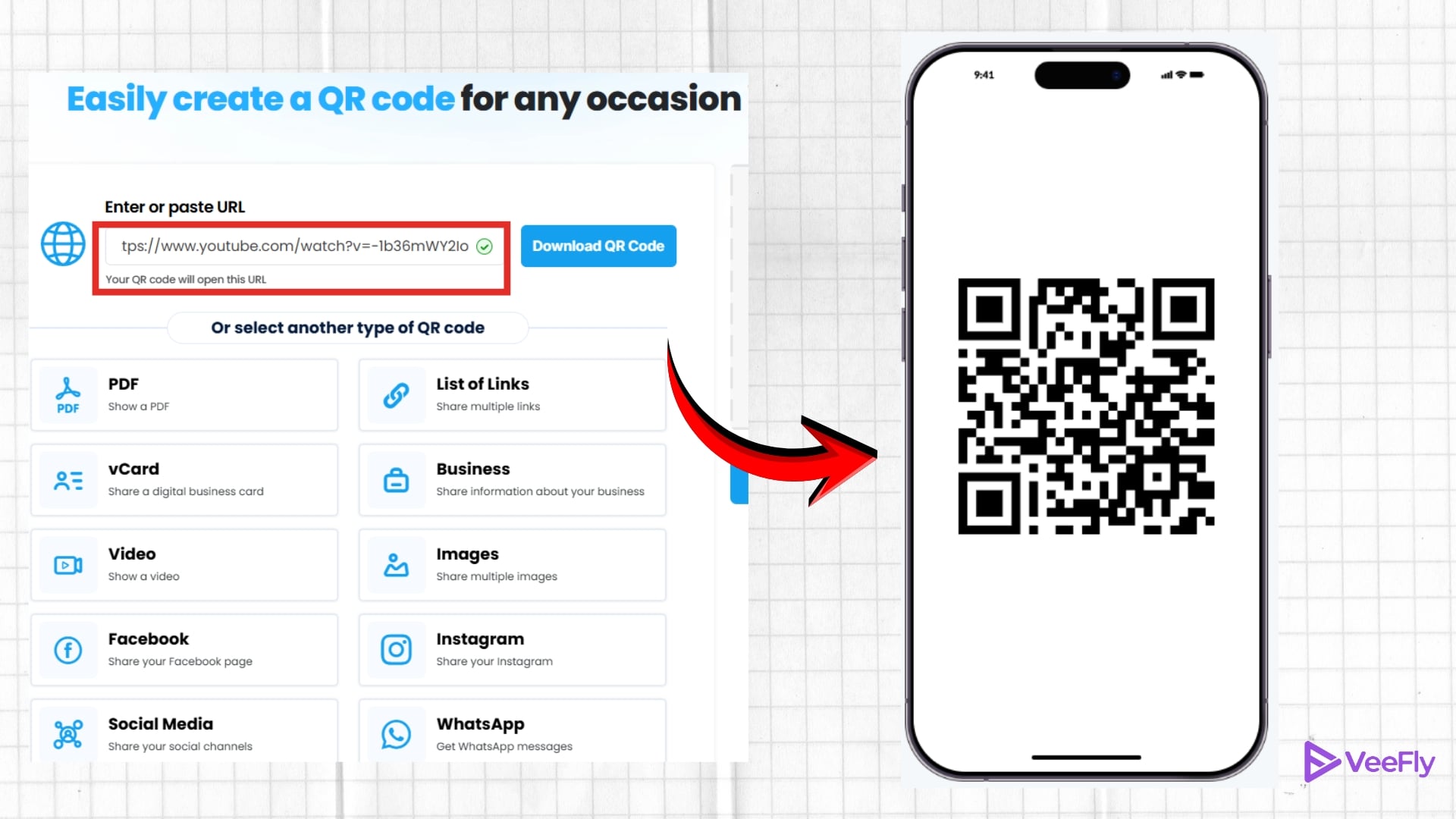
- Enter the YouTube video URL you want to generate a QR code for
3. Customize
- Choose Static QR or Dynamic QR, then click the Generate QR Code button.
- Modify it to match your brand identity
4. Download
- Your code is created as soon as you click the button. You can scan to test if your code is working.
- Select the image type, then click the download button.
What Tools to Use While Creating YouTube QR Codes?
With the right generator, you can be sure your codes will be fast, scannable, and high quality. Here are the top 3 picks:
- QR Tiger: A reliable YouTube video QR code generator that lets you customise colours and frames. It is ideal for YouTube creators looking for a professional code for free.
- Canva: The all-in-one design platform with some of the most creative templates out there. Canva lets you generate the UR code for free, and it’s simple to use.
- QR Code Monkey: Highly trusted for a clean interface and a high-resolution download. If you are looking for an offline QR code generator, this one is a good option.
Where Can You Use a YouTube QR Code?
Once you’ve created your QR code, you can use it almost anywhere your audience is likely to see it. Popular places include:
- Business cards
- Product packaging
- Flyers and brochures
- Posters and banners
- Restaurant menus
- Presentation slides
- Trade shows and exhibitions
- Event booths
- Email signatures
- Social media profile graphics
Adding a YouTube QR code link to your marketing materials creates a seamless way for people to move from offline to online content.
Benefits Of Converting A YouTube Link Into A QR Code
YouTube to QR code has many benefits, which help you grow your YouTube channel. As you know, the maximum number of views that you receive comes from mobile users. Therefore, the QR code generator for YouTube allows users to interact more with your video, which allows them to like, comment, or share your video. Along with this being one of the easiest ways to promote your video, here are other benefits:
- Easy access to your videos
- Streamline video link-sharing
- Grows your channel and increases your subscriber list
- Saves effort and time of your users
- Promotes your YT video using a QR code
Making a QR code is one of the best ways to buy YouTube subscribers for your channel.
Final Thoughts
Now that you know how to create a QR code for a YouTube video, sharing your content becomes much easier. Whether you’re a creator, educator, or business owner, a QR code helps people access your videos instantly without searching or typing a link. If you’ve been wondering how to get a QR code for a YouTube video or how to turn a YouTube video into a QR code, all it takes is the right tool and your video URL. Create your QR code, test it, and start using it wherever your audience is most likely to find you.
Frequently Asked Questions
Q1. How much does it cost to create your own QR code?
Most QR codes for YouTube can be generated for free using QR Tiger and Canva. You need to pay only for advanced features if you wish to avail yourself of customisation.
Q2. Do QR codes expire?
YouTube QR code generator can create dynamic and static formats. If you choose static, the code never expires as long as the URL works. The code expires once the URL stops working, and you cannot edit it. Users choosing dynamic QR codes can edit the code after it expires.
Q3. Where can I find my YouTube QR code?
You can generate and download your YouTube QR code directly from any QR code generator. Just paste your URL link into the generator.
Q4. Where can you use a YouTube QR Code?
You can use a YouTube QR Code on your other social media platforms to grow your channel’s reach. You can also use a YouTube QR Code in Magazines, brochures, and leaflets.
