


- Viewers donate to be recognised. Acknowledging a Super Chat within seconds creates positive reinforcement that triggers more donations.
- Tying donations to a specific, on-stream event, like a spicy food challenge or unlocking a new game level, gives viewers a collective goal.
- Creators keep approximately 70% of Super Chat revenue, making it one of the platform’s highest-margin monetization tools.
- Habit-forming, scheduled streams build the parasocial trust viewers need to part with their disposable income.
- Begging reduces donations. Naturally, integrating your gratitude for existing Super Chats is the best way to encourage future ones.
If you want more Super Chats while live streaming, focus on interactive streams where viewers feel noticed and have a reason to engage. Welcome questions, respond to Super Chats personally, have clear stream goals, and explain the mechanics without continually asking for donations. Gaming, Q&A, tutorials, reactions, and live shows are all particularly good fits. They lend themselves to real-time interaction with viewers.
What Are YouTube Super Chats?
If viewers want their favourite YouTuber’s comment noticed on YouTube Live, they may make a monetary contribution. Super Chats are paid messages highlighted in the live chat; how long they remain highlighted or pinned also depends on how much users pay. Super Chats are a way to express gratitude to the YouTuber.
How to Be Eligible for YouTube Super Chats?
Not every channel can accept live donations. To enable Super Chats, your channel must meet the baseline eligibility requirements for the YouTube Partner Program’s fan-funding tier.
- Subscriber Count: The expanded YPP fan funding threshold can start at 500 subscribers when you meet the other eligibility requirements.
- Watch Time: You need either 3,000 public watch hours in the last 12 months OR 3 million public Shorts views in the last 90 days.
- Recent Uploads: You must have 3 public uploads in the last 90 days.
- Location & Age: You must be at least 18 years old and live in one of the countries where Super Chat is currently supported.
- Policy Compliance: Your channel must follow YouTube policies and the applicable Commerce Product Module policy.
How Do YouTube Super Chats Work During Livestreams?
Super Chat is an easy-to-use live video chat feature. Here’s how it works:
How Viewers Send Super Chats
- Users click the $ dollar icon in the live chat
- They choose the Super Chat option
- Viewers select a payment amount within the allowed limits
- The Super Chat is instantly posted in the live chat
- Messages appear highlighted for visibility.
- The message appears with visual highlighting, with its visibility depending on the amount purchased.
Creators Interaction in Real Time
- Creators can easily spot these highlighted messages
- Personalized shout-outs can increase visibility
- Engagements feel more personal and interactive
- Builds a stronger live streaming community.
Earnings & Monetization
- Earnings from Super Chat are also part of the creator’s YouTube revenue.
- Creators get 70% of the confirmed revenue of a Super Chat, after local sales tax and iOS App Store fees are deducted.
- It helps diversify income beyond ads
- Ideal for live-focused creators who want to make a long-term income-based career.
How to Get More Super Chats on YouTube?
If you’re trying to learn how to get Super Chats on YouTube, focus on making a livestream that is interactive, engaging, and makes viewers feel seen and involved. The strategies below can help:
Familiarise Viewers With Super Chats
- At the start of your live streams, let your viewers know Super Chats will be enabled.
- A simple reminder sets expectations and avoids confusion.
- If viewers are unfamiliar with the feature, briefly explain how they can use it without repeatedly asking them to pay.
Set Clear Goals & Incentives
- Organise a Super Chat challenge and encourage more viewers to contribute.
- Make it entertaining and exciting since viewers want to help creators accomplish goals and see them through to completion.
- Rewards can be as simple as a shoutout during the Live broadcast, a gift hamper for the winner, or memorabilia from your collection.
Acknowledge Viewers
- When viewers submit Super Chats, thank them regularly.
- Ensure they know how much you value what they’ve done by recognising and thanking them individually throughout the stream.
- Viewers are more likely to submit additional Super Chats when they see you appreciate their support.
- YouTube also recommends acknowledging viewer contributions, as recognition can strengthen a sense of connection and gratitude in the community.
- Creating an upbeat, appreciative environment during your live broadcast can win over your viewers and keep them coming back for more.
Build a Community
- Interaction is crucial in Live Stream Chats.
- Respond to comments, ask questions, and encourage audience engagement.
- If your audience sees that you’re paying attention to what they say, they’ll be more likely to send you Super Chats.
- Use the audience’s names, respond to their feedback, and include them in the discussion to make them feel valued.
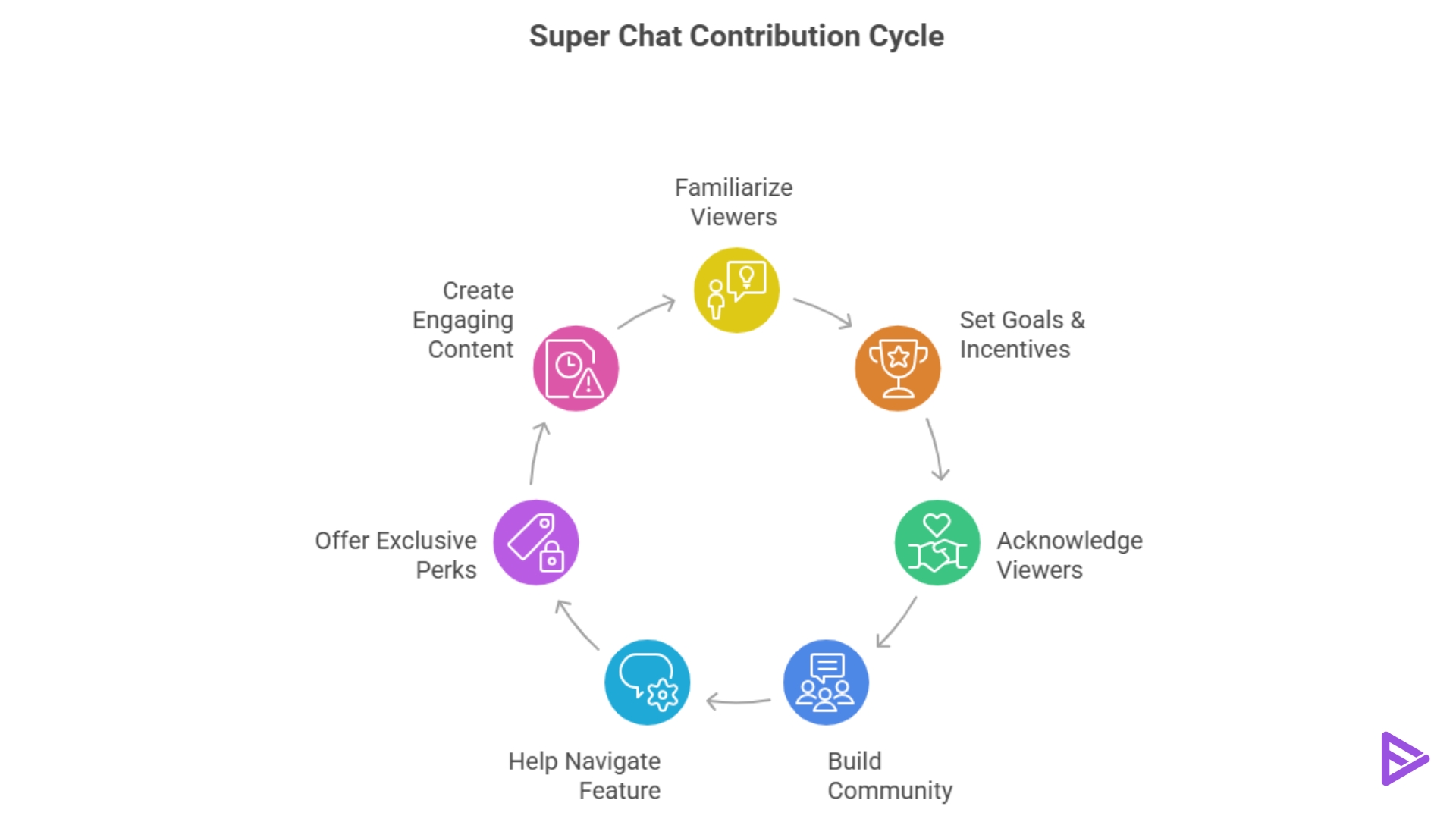
Help them navigate the Feature.
- Viewers may not know how Super Chats work. Therefore, they need to understand the feature’s benefits and how it helps both the creator and the viewer.
- In your live stream, explain how Super Chats support your channel and how to send them.
- You can mention Super Chats throughout the video to remind viewers that their remarks will be highlighted and pinned for everyone to see.
Exclusive Perks
- Consider rewarding viewers with exclusive access for sending Super Chats.
- Perks may include early access to content, unique emojis or badges, or even an invitation to a private Q&A session after the live.
- By giving them something of value in return for their support, these benefits make Super Chats more appealing to viewers.
Create Engaging Content
- You can motivate viewers to submit Super Chats during your live stream by creating a sense of urgency.
- To encourage viewers to act, you might use countdowns or limited-time promotions.
- Urgency motivates viewers to act immediately, increasing their chances of sending additional Super Chats.
Best Types of Livestreams for Super Chats
2. Q&A Livestreams: “Ask Me Anything” formats are highly lucrative because viewers will pay to ensure their specific question skips the queue and gets answered.
3. Podcast/Live Shows: Talk shows rely heavily on viewer opinions. Super Chats let the audience become a “guest” on the show for a few seconds.
4. Reactions: Watching events, new music videos, or press conferences live with your audience prompts them to donate to share their own hot takes.
5. Tutorials and Coaching: Educational streamers receive Super Chats as a “thank you” for providing valuable, free advice that helped the viewer solve a problem.
How to Enable Super Chat on YouTube?
If you are wondering how to enable Super Chat on YouTube, first check your eligibility in YouTube Studio. Once your channel is eligible, you can manage Super Chat and Super Stickers through the Supers section in the Earn area.
Final Thoughts
So now you know how to get Super Chats on YouTube live streams. The best way to do that is to deliver great, interactive content, engage with your audience, and give them real reasons to get involved. When you’re consistent, you cultivate a community where Super Chats become a natural part of your live interaction, rather than something you constantly have to beg viewers to send. While Super Chats help you engage with viewers during live sessions, your regular videos offer another way to build your channel. Learn more about buying YouTube views.
Frequently Asked Questions
Q1. How Do You See All Super Chats On YouTube?
All Super Chat purchases will be displayed in your Super Chats and Super Stickers activity under the Earn tab in YouTube Studio under the Menu section.
Q2. What Is The Maximum Amount Of Super Chat On YouTube?
The total purchase limit is up to $500 per day or $2,000 per week for Super Chats, Super Stickers, and Super Thanks, but limits may vary by country or region.
Q3. How Many Subscribers Do You Need To Get Super Chat On YouTube?
For qualified creators on the expanded YPP, fan funding features unlock at 500 subscribers if the creator also has 3 valid public uploads in the past 90 days and either 3,000 valid public watch hours in the past 12 months or 3 million valid public Shorts views in the past 90 days. You must also meet additional requirements to be eligible for Super Chat, including being 18 years old and residing in a supported country.
Q4. Do YouTubers get paid for Super Chats?
Yes, creators receive 70% of confirmed Super Chat revenue after deducting applicable local sales tax and iOS App Store fees.
