



Key Takeaways
- To add hashtags to YouTube videos, open YouTube Studio and follow a few steps to add the # sign and keyword in the description box.
- Knowing how to use hashtags on YouTube is essential; you can add them to your video title or description with some simple steps.
- Leverage trending and branded hashtags, don’t overdo it, and follow other best practices.
Knowing how to add hashtags to YouTube videos is essential. Open YouTube Studio, choose the video details, then type the # sign followed by the keyword in the description box. YouTube shows up to three such hashtags just above the video title. You can put them anywhere in the description, but placing them at the bottom is a standard, clear practice.
What Exactly Are YouTube Hashtags?
YouTube hashtags start with the # symbol. YT hashtags are phrases and keywords relevant to the video’s title and description. These help viewers find your videos. If you use a similar hashtag in another video, viewers will see other YT videos with similar hashtags. You can use hashtags in the video title, description, and the channel description.
Why Add Hashtags to YouTube Videos?
Adding Hashtags to YouTube videos gives your content the extra boost it requires for better visibility among your target audience.
Increases Discoverability
As you know, YouTube is the second-largest search engine in the world. Sometimes, viewers search for food recipes, fitness videos, tutorials, and product review videos on YouTube using hashtags. Relevant hashtags ensure your video appears in search results.
Improves YouTube SEO
Hashtags added to YouTube videos allow the algorithm to understand what type of content your channel has. It complements your SEO-optimized titles and descriptions to attract more potential subscribers to your channel
Increases Uniqueness
YouTube has over 47 million active channels across a wide range of genres. Adding relevant hashtags to your YouTube channel increases its perceived value and uniqueness. You can also use the hashtags your competitors use on their videos to get more views on your YouTube videos.
Categorize your Videos
Although organising your videos into specific playlists is essential, you don’t necessarily need to maintain lengthy playlists, since YouTube hashtags let you categorise your videos in multiple ways.
How to Add Hashtags to a YouTube Video?
You can use hashtags in two ways that can help you get more views on your channel:
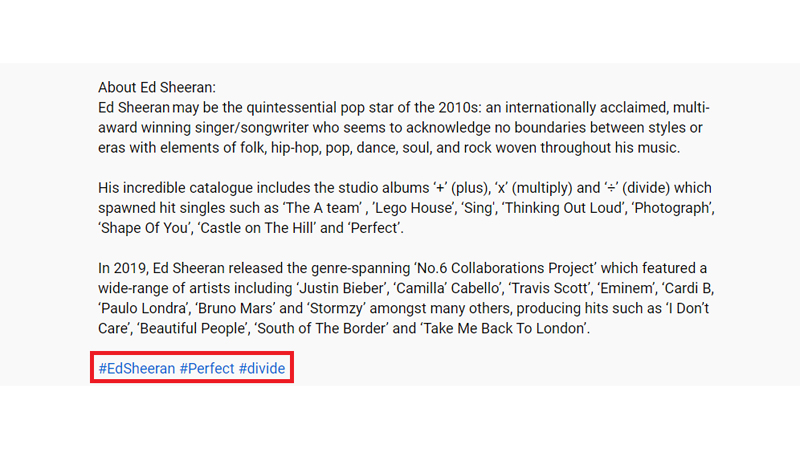
Add hashtags in your video description:
You can add hashtags in the video description. YouTube lets you add up to 15 hashtags in the description. But I suggest you add the top 3 hashtags you think will help you get views on your YouTube videos. Also, if you have a beginner YouTube channel, hashtags can complement the best YouTube SEO practices. If you use more than 15 hashtags, YouTube might ignore all your hashtags, and they might not help users find your videos. Along with hashtags, to improve the video’s reach and visibility, you can buy YouTube views for maximum discoverability. This is how YouTube hashtags look when added to a YouTube video description.
Add hashtags in your video title:
You can also add YouTube hashtags to your video title. The first 3 hashtags you add to your title will be visible above your title. It will appear as hyperlinks. Here’s how it looks when you add them to your title.
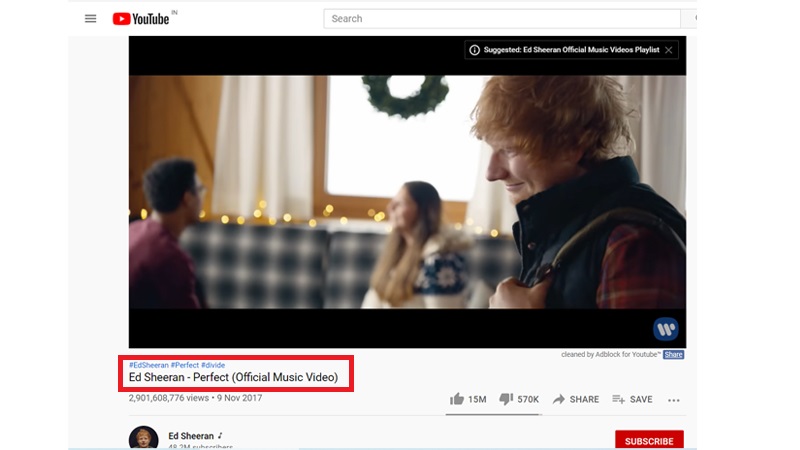
When viewers click these hashtags, YT redirects them to a list of videos with the same hashtag. If you have added similar hashtags to your videos, chances are that viewers may find them when searching through YouTube hashtags.
Tips for Finding the Best Hashtags for YouTube videos
YouTube has certain rules for everything, and hashtags are no exception. Follow community guidelines when learning how to add hashtags to YouTube videos. Here we go:
Explore YouTube Trending Videos
Looking at what’s trending right now will give you a deep dive into the popular YouTube hashtags that are performing well. However, I recommend checking your content for relevance with trending YouTube video hashtags and choosing the ones that resonate with your channel and target audience. If you find related videos that match your content, consider adding their hashtags to your videos.
Browse Hashtags from your competitors
Explore your competitor’s all-time best-performing videos. Use those hashtags on your YouTube videos. This strategy works well if your content quality is better than your competitors’. It helps you put your videos in front of the audience your competitor has already attracted, without starting from scratch.
Leverage YouTube Suggest
The results that appear on YouTube Suggest while you search for videos provide great insights into trending and popular hashtags in your niche. Simply type ‘#’ in the search bar, and YouTube will reveal the most popular hashtags. Simply choose the one that matches your content and implement the strategy to add them to YouTube videos.
Save time and use the YouTube Hashtag Generator tool
If you don’t want to invest so much time discovering the right hashtags for your videos, you can simply look for a reliable AI YouTube Hashtag generator and let it do all the heavy lifting. You will simply need to add your video title or URL to the tool, and it will scour the platform to analyse your competitors, the trending hashtags on YouTube in your niche, etc. It will then generate the best set of YouTube hashtags that increase the discoverability of your YouTube videos.
How to Use YouTube Hashtags Effectively?
A few more points you must remember when learning how to add hashtags to YouTube videos to get maximum results.
Don’t Overdo YouTube Hashtags
Although you can add up to 15 hashtags in a YouTube video, I recommend using 3-5 hashtags in a single video. YouTube will ignore hashtags if you use too many. Therefore, for best results, limit your YouTube hashtag use.
Leverage Trending or Branded Hashtags
As stated earlier, leveraging trending or highly branded hashtags gives you an added advantage to be a part of a trend and, hence, attract some viewership for your videos. It can give your videos maximum exposure for a limited time.
Create your own Branded Hashtags
For example, suppose you have a beginner travel vlogging channel. You can include a destination series name, your trip name, or another unique description as hashtags to expand your videos’ reach and grow your YouTube channel. This gives your channel and videos a unique identity with your target audience.
Do not use Vulgar or foul Language
Refrain from using obscene language, sexually explicit words, provocative language, hateful words, etc., that will violate YouTube’s terms and guidelines. In such cases, YT will directly remove the video from the platform and possibly ban your YouTube Channel.
Don’t use spaces in your YouTube Hashtags
Remember, you don’t use spaces in your YouTube hashtags. If your hashtag has more than 3 or 4 words, you simply group them together. For instance, if you create content around solo travelling and make a solo vlog about travelling to Rome. Here are a few hashtags you can use: #travelInspiration, #Romesolodiaries, #Romanadventures, etc.
Final Thoughts
I hope this blog has helped you understand how to add hashtags to YouTube videos. YouTube hashtags are easy to find and use, and they can be highly beneficial for attracting views from your potential audience. Always follow the guidelines in this article to maximise the impact of YouTube hashtags. Along with using relevant hashtags, you can explore ways to get free YouTube views and help more people discover your videos.
Frequently Asked Questions
Q1. Will the YouTube Hashtags I Use Affect My SEO and YouTube Rankings?
Yes, YouTube hashtags can help your videos rank higher and improve discoverability, bringing more views and subscribers. Along with tags, titles and descriptions are essential, too. You can use the AI YouTube description generator and AI YouTube title generator to speed up the process of creating catchy titles and descriptions.
Q2. Can Hashtags increase views on YouTube video?
Since hashtags can help viewers discover your channel, they can increase video views and help retain audiences.
Q3. What hashtags should you put on YouTube?
The type of hashtags you can use depends on your YouTube content and your niche. To grow your channel’s reach, you can also promote your video on YouTube.
Q4. What are the tips for finding the best Hashtags for a YouTube video?
Look for trending videos in your niche, analyse your competitors and the hashtags they use, and craft some unique branded hashtags that align with your channel and its content.
Q5. What are the most trending YouTube hashtags today?
Some of them include #Trending, #Shorts, #Vlog, #Motivation, #Football, #Funny, and more.
