



Key Takeaways
- A YouTube channel trailer is your first impression for non-subscribers. It automatically plays on your channel homepage and helps visitors quickly understand who you are, what content you create, and why they should subscribe.
- Keep your trailer short and focused. Most experts recommend 30–60 seconds, with a strong hook in the first few seconds to capture attention and keep viewers from leaving.
- Show viewers what they’ll gain from your channel. Highlight your niche, showcase your best content, communicate your unique value, and let your personality shine through to build trust and engagement.
- Include a clear call-to-action (CTA). Every effective channel trailer should encourage viewers to subscribe, watch a playlist, or explore more of your content to increase conversion rates.
- Optimise and update your trailer regularly. Use captions, ensure mobile-friendly visuals, maintain consistent branding, and refresh your trailer whenever your content strategy, branding, or channel goals evolve.
- Upgrade your trailer when your content strategy or branding changes. If you are wondering how to edit your YouTube channel trailer settings, you can make these changes by logging into your account and going to the YouTube Studio’s Customisation section.
To make a YouTube channel trailer that attracts views, create a short, engaging video that introduces your channel, explains what viewers can expect, showcases your best content, and gives them a clear reason to subscribe. If you are asking how to make a YouTube channel trailer, include a clear hook, the value your content provides, your best videos, and a strong call to action.
In this guide, you’ll learn how to create a YouTube channel trailer, why it matters, and the best practices that can help turn casual visitors into loyal subscribers.
What Is a YouTube Channel Trailer and Why Does Every Channel Need One?
A YouTube channel trailer is a short introductory video displayed on your channel homepage for viewers who haven’t subscribed yet. It acts as your channel’s elevator pitch, giving new visitors a quick overview of your content, personality, and the value you offer.
Unlike regular uploads, a channel trailer is specifically designed to welcome first-time visitors and encourage them to subscribe.
Think of it as the movie trailer for your channel; it showcases the best parts of your content and helps viewers decide whether they want to see more.
Why Is a YouTube Channel Trailer Important?
A channel trailer for YouTube serves as your digital first impression. New visitors often know very little about your channel, and a compelling trailer can quickly explain why your content deserves their attention.
Benefits of creating a YouTube channel trailer include:
- Introducing yourself and your brand
- Explaining your channel’s purpose
- Highlighting your best content
- Building trust with viewers
- Increasing subscriber conversions
- Directing visitors to playlists or videos
Since the trailer automatically appears for non-subscribers, it creates an opportunity to turn casual viewers into long-term followers.
How to Make a YouTube Channel Trailer That Converts
If you’re learning how to make a YouTube channel trailer, focus on one simple goal:
Convince viewers that subscribing to your channel will benefit them.
Many creators make the mistake of talking too much about themselves. Instead, focus on what your audience will gain.
Ask yourself:
- What problem do I solve?
- Who is my content for?
- Why should someone subscribe today?
- What makes my channel different?
Successful channel trailers answer these questions within the first minute. Experts generally recommend keeping trailers concise and focused on subscriber value.
Ideal YouTube Channel Trailer Length
One of the most common questions creators ask is how long a **YouTube channel trailer** should be.
Most experts recommend keeping it between 30 and 60 seconds. Some creators extend it to 90 seconds, but shorter videos generally perform better because they maintain viewer attention.
Recommended Length Guidelines
| Creator Type | Ideal Length |
|---|---|
| New Creators | 30 – 45 Seconds |
| Educational Channels | 45 – 60 Seconds |
| Business Channel | 30 – 60 Seconds |
| Entertainment Channels | 30 – 90 Seconds |
Remember: every second should communicate value.
How to Create a YouTube Channel Trailer: Essential Elements
When learning how to create a YouTube channel trailer, make sure it includes the following components.
1. Hook Viewers Immediately
The first few seconds determine whether someone keeps watching.
Start with:
- A bold statement
- An intriguing question
- A surprising result
- An exciting visual montage
Your opening should immediately grab attention and make viewers curious.
2. Explain What Your Channel Offers
Clearly tell viewers:
- What your channel is about
- Who your content helps
- What type of videos you create
- What value they’ll receive
Avoid long introductions and get straight to the point.
3. Showcase Your Best Content
Instead of simply telling viewers what you do, show them.
Include:
- Clips from popular videos
- Behind-the-scenes footage
- Success stories
- Results you’ve achieved
- Audience reactions
Visual proof is often more persuasive than words.
4. Add Personality
People subscribe to creators they connect with.
Show your authentic personality by:
- Speaking directly to the camera
- Using your natural tone
- Sharing your mission
- Showing genuine enthusiasm
Authenticity helps build trust and encourages subscriptions.
5. Include a Strong Call-to-Action
Every successful YouTube channel trailer should end with a clear call to action.
Ask viewers to:
- Subscribe
- Watch a playlist
- Explore your latest videos
- Join your community
Never assume viewers know what to do next.
Channel Trailer for YouTube: Best Practices for More Subscribers
Follow these proven strategies to maximise your trailer’s effectiveness.
Keep It Short and Focused
Don’t try to explain everything about your channel.
Instead, answer one question:
Why should someone subscribe?
Everything in your trailer should support that answer.
Optimize for Mobile Viewers
Since a large percentage of YouTube traffic comes from mobile devices:
- Use readable text
- Keep visuals clear
- Add captions
- Avoid cluttered screens
Use Captions and Subtitles
Captions help:
- Improve accessibility
- Increase engagement
- Reach viewers watching without sound
Maintain Consistent Branding
Use:
- Brand colors
- Consistent fonts
- Channel logo
- Recognizable visual style
Strong branding improves recall and recognition.
Update Your Trailer Regularly
As your content evolves, your trailer should evolve too.
Update it when:
- You rebrand
- Launch a new content series
- Reach major milestones
- Change your content strategy
Refreshing your trailer ensures it remains relevant.
Sample YouTube Channel Trailer Script
Here’s a simple template:
“Hey, I’m [Name], and on this channel, I help [target audience] achieve [desired result].
Every week, you’ll find videos about [topic 1], [topic 2], and [topic 3].
Whether you’re looking to learn, grow, or stay informed, you’ll find practical content that helps you reach your goals.
If that sounds helpful, hit Subscribe and start with one of the videos below. I’ll see you there!”
How to Add a Channel Trailer on YouTube
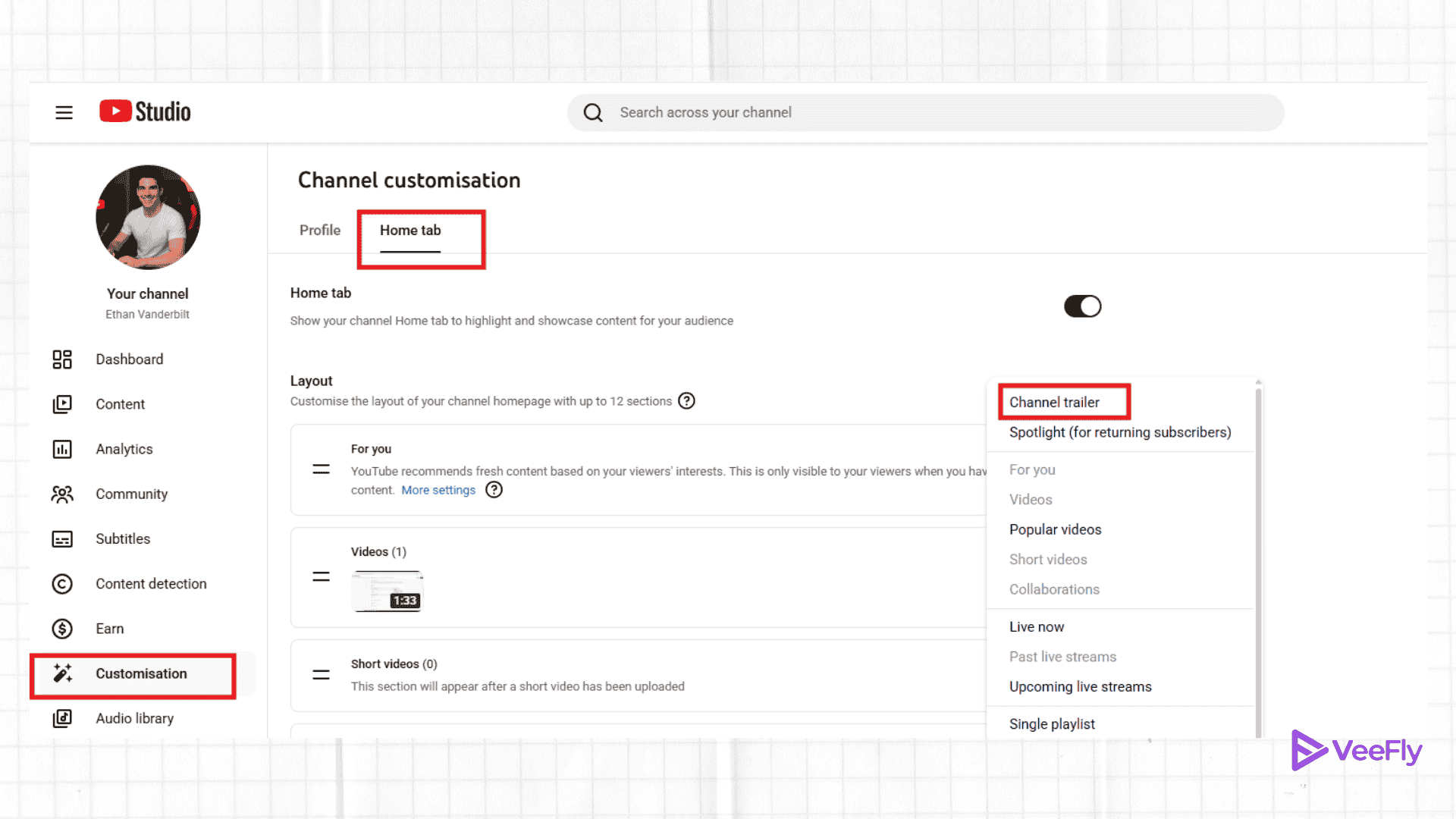
After creating your trailer, follow these steps:
Step 1: Open YouTube Studio
Log in to your YouTube account and access YouTube Studio.
Step 2: Click Customisation
Select Customisation from the left-side menu.
Step 3: Open the Layout Tab
Navigate to the Layout section.
Step 4: Add a Channel Trailer
Locate the Video Spotlight section and choose Channel Trailer.
Step 5: Select Your Video
Choose the video you’d like to display for non-subscribers.
Step 6: Publish Changes
Click Publish to save your settings.
List of Best YouTube Channel Trailer Maker
If you’d rather use a YouTube channel trailer maker, here are some tools that offer editing capabilities, templates, graphics, and even the option to repurpose existing video.
Descript
If you want a full-fledged tool, then you can invest in Descript. Best for text-based editing, AI-integrated features, background removal, adding music, and tracking the channel performance as well.
Canva
The go-to tool for beginner-friendly use. With a huge library of stock photos and videos, drag-and-drop tools, and easily customizable templates or designs.
Renderforest
The tools are convenient and professional, and they include advanced templates for cinematic shots, typography, etc. For a polished channel trailer, creators can also adapt to pre-shot professional footage.
OpusClip
You can upload your long-form videos, and the tool will use AI to craft a perfect channel trailer for you. Additionally, you can use the platform to upload content to all social media platforms.
Biteable
This is one of the most straightforward YouTube channel trailer makers you can try! You must create an account or log in to Biteable to make your channel trailer. You can customise the text and music to suit your needs. Guess what? You can also choose images from those available on the platform. You can also select videos and images from your device. You can make as many videos as you want on the free mark, but you cannot remove the watermark.
Veed.IO
This channel trailer maker has all the video editing tools you need to create a trailer. It also offers a wide range of stickers and lets you add customised titles to the video. However, the free version lets you create only one video under 10 minutes and 50MB, with the Veed watermark.
Make Web Video
Make Web Video is a YouTube channel trailer maker that offers multiple ways to make a trailer. The free version lets you create unlimited projects with unlimited bandwidth and storage, and you can also make movie trailers on this platform.
FlexClip
The free version of this YouTube channel trailer maker allows you to make a maximum of 12 projects. You cannot download the YouTube channel trailer maker without a watermark, but you can make a video up to 1 minute long.
ClipChamp
You’ll love making your YT channel trailer on Clipchamp, since it has a YouTube channel trailer maker without a watermark! Isn’t that great? You can export unlimited videos in 480p SD.
Common Mistakes to Avoid
Many creators hurt their conversion rates by making these mistakes:
- Making the trailer too long
- Talking only about themselves
- Not explaining channel benefits
- Using poor audio quality
- Forgetting a call-to-action
- Showing outdated content
- Ignoring mobile viewers
Avoiding these common issues can significantly improve subscriber conversions.
Final Thoughts
A well-crafted YouTube channel trailer can be one of the most effective tools for growing your audience. Whether it’s your first time making a YouTube channel trailer or you’re updating an existing one, concentrate on what matters most to your viewers: being authentic, having clear branding, and including a strong call to action. After you finish your trailer, VeeFly’s creator tools can also help you promote and grow your YouTube videos.
Frequently Asked Questions
Q1. How do I make a YouTube channel trailer?
To make a YouTube channel trailer, create a short video that introduces your channel, explains what viewers can expect, showcases your best content, and ends with a strong call to subscribe.
Q2. How do I create a YouTube channel trailer for a new channel?
If you’re starting a new channel, focus on your niche, target audience, and the value your content provides. A simple 30–60 second introduction is usually enough to create an effective channel trailer.
Q3. What makes a good channel trailer for YouTube?
A successful YouTube trailer is short, engaging, clearly communicates your content strategy, showcases your best work, and encourages viewers to subscribe.
Q4. How long should a YouTube channel trailer be?
Most experts recommend keeping a channel trailer between 30 and 60 seconds, although some creators may extend it to 90 seconds when necessary.
