


Key Takeaways
- YouTube Studio Desktop Dashboard: The best way to sort and view your earliest public subscribers chronologically is to navigate to the YouTube Studio desktop dashboard.
- YouTube Privacy Defaults Hide Most Names: 70% to 90% of YouTube users keep their subscriptions private, so your first subscriber to post a comment isn’t your first follower; it is your first supporter.
- Google Takeout Offers Archival Data: If you export your channel archive through Google Takeout, you’ll get raw CSV records that include subscription dates, even if the dashboard views change over time.
- Mobile App Limitations: The standard YouTube Studio mobile app shows only total counts and recent summary cards; historical names on mobile will appear in the browser only when it is set to Desktop Mode.
All YouTube creators remember their first subscriber. But finding that same person years or months later can be confusing for creators because analytics dashboards frequently change, and privacy rules are quite strict. This complete 2026 guide explains the technical details for finding your first channel supporters on desktop and mobile devices.
How Does YouTube Store and Display Historical Subscriber Data?
YouTube maintains subscriber activity in its server databases, and only public accounts display in channel dashboards. Most viewer subscriptions are automatically hidden from creators unless they choose to show them. As a result, creator analytics focus on current audience trends rather than comprehensive historical logs.
YouTube Studio shows a Recent Subscribers card, which defaults to a 28-day period but can be extended to Lifetime view. YouTube does not offer a built-in chronological audit that returns all subscribers for all accounts. People who make their subscription public will appear in your Studio list only if they are subscribers. YouTube’s user base is largely anonymous, with industry analysis firm AdaptlyPost estimating that around 70-90% of YouTube users have their subscription settings set to private.
Deleted accounts, spam removal, and brand quirks create even more gaps. Both desktop and mobile provide similar access; mobile will need a desktop browser workaround. So you should use more than one approach, since no single tool can provide a complete history.
YouTube Growth Strategist Derral Eves says that “The first subscribers that you have to your channel are the ones that will give you valuable qualitative feedback, but keep in mind that the platform’s default privacy settings mean that the first true supporters are likely to be the ones that are not obvious in the numbers.”
Method 1: Use YouTube Studio’s Recent Subscribers List
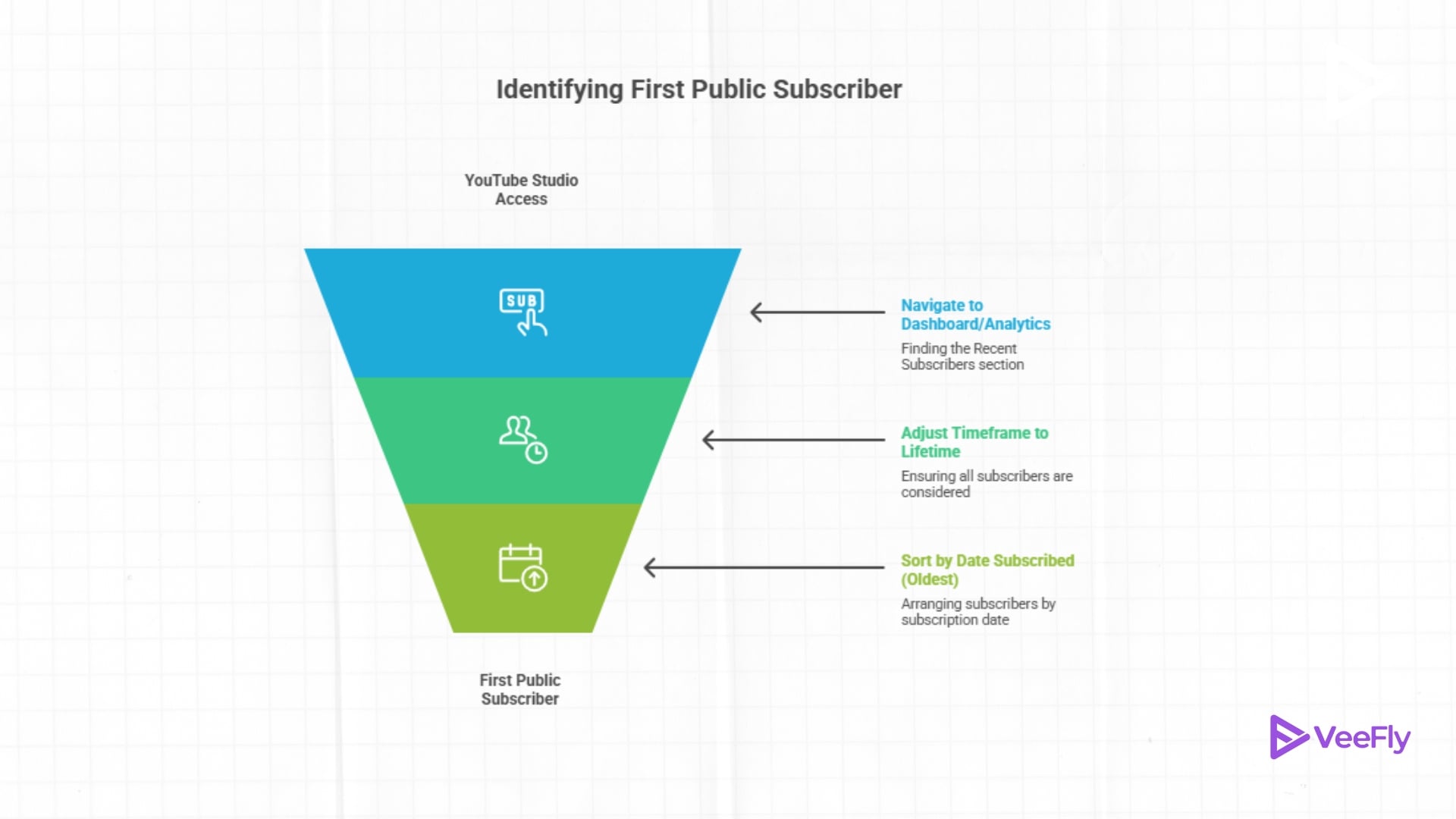
Studio’s Recent Subscribers list is the fastest way to see your first subscriber on YouTube if that person made their subscription public. Here’s how to see your first subscriber on YouTube:
Desktop Steps
- Go to studio.youtube.com and sign in to your channel.
- Click Dashboard on the left sidebar.
- Scroll to the Recent Subscribers card and click See All.
- Change the timeframe dropdown from Last 28 Days to Lifetime.
- Click the Sort button and select Date Subscribed (Oldest).
- The top entry is your first public subscriber, assuming they have not unsubscribed.
Mobile Steps
- Open the YouTube Studio app on iOS or Android.
- Tap Analytics at the bottom.
- Tap Audience at the top.
- Scroll to Recent Subscribers and tap View More.
- Adjust the timeframe to Lifetime and sort by the oldest date.
Method 2: Download Your Full Subscriber List
Google Takeout exports your YouTube data, including subscriber records, as a downloadable archive. This method captures any subscriber information YouTube has stored, even if it no longer appears in Studio. Here’s how to see your first subscriber on YouTube:
- Visit takeout.google.com and sign in.
- Click Deselect All at the top.
- Scroll to YouTube and YouTube Music, check both boxes.
- Click Next Step at the bottom.
- Choose your delivery method (email link, Drive, etc.) and export frequency (export once).
- Click Create Export and wait for the email notification (usually 10 minutes to 2 hours).
- Download the archive and unzip it.
- Open the subscribers folder and find the CSV file (often named subscriptions.csv or something similar).
- Open the CSV in Google Sheets, Excel, or any spreadsheet app.
- Find the SUBSCRIBED_DATE column and sort it in ascending order (oldest to newest).
- The top row shows your earliest recorded subscriber, including their channel name and URL.
Takeout exports only the data YouTube currently stores. If a subscriber deleted their account years ago, the record may no longer exist. The CSV columns typically include channel URL, channel name, and subscription date. File sizes vary, but most creators keep archives under 50 MB unless they have a massive YouTube live subscriber count. Keep this data private. It is for your eyes only.
Which YouTube Subscriber Tracking Method Should You Use?
The right way to check your first subscribers on YouTube depends on your technical comfort, the device you are using, and whether you need to view them immediately or store them long term.
| Method | Best Supported Platform | Information Displayed | Handling of Private Accounts | Export Capability |
| YouTube Studio Dashboard | Desktop Web Browser | Up to 100 recent/lifetime public subscribers, avatars and dates | Excluded entirely | No direct export |
| Mobile Browser (Desktop Mode) | iOS / Android Web Browser | View all the subscribers on the desktop. | Excluded entirely | No direct export |
| Google Takeout Archive | Any Web Browser / PC | Full server CSV history, channel URLs, subscription dates. | Excluded if deleted/purged | Downloadable CSV / JSON |
Why Are Your First YouTube Subscribers Missing or Hidden?
If you cannot find your first subscriber after trying all three methods, one of these scenarios is likely at play:
- First subscriber set to private: You will never see their identity. Privacy settings override all creator tools.
- Account deleted or flagged as spam: YouTube removes spam subscriptions retroactively. Your true first legitimate subscriber may be the second or third entry in the chronology.
- Data not refreshing in Studio: Wait 48 hours after a new Studio subscription before it updates. Check again.
- Brand account vs personal account confusion: Make sure you’re signed in to the correct channel in Studio and Takeout.
- Takeout export incomplete: Some brand accounts produce partial exports. Try exporting again with only YouTube selected.
Final Thoughts
When privacy restrictions and account purges are the problem, you need to use both the native tools on the dashboard and archival exports to find your first YouTube subscriber. YouTube Studio lets you search publicly in real time, and Google Takeout can archive your channel in a spreadsheet so you can accurately track your earliest supporters. Knowing who supported you from the start can help you build stronger relationships with your community. When you’re looking to grow your subscribers and turn those first milestones into consistent growth, consider video promotion services to get your content in front of the right viewers faster.
Frequently Asked Questions
Q1) Why is the number of subscribers in my list in YouTube Studio not equal to my total subscribers?
The number of subscribers you have is the total number of active accounts that follow your channel, while the number of subscribers in the YouTube Studio subscriber list is only the number of accounts that have opted to make their subscriptions public. Most users leave their privacy settings at the default, so your public list will always have fewer names than your total list.
Q2)Can third-party browser extensions tell you who’s a private YouTube subscriber?
No third-party product or browser extension can access private subscribers without violating YouTube’s privacy architecture. Only public data from YouTube’s official systems can be used by services that provide API analytics. Beware of tools that claim to reveal private subscriber information, as they could be in violation of Google’s Terms of Service.
Q3)If a viewer decides to cancel their YouTube account, what happens to my list of subscribers?
If a viewer permanently deletes or closes their Google/YouTube account, they will be removed from your subscriber count, and they will no longer appear in your YouTube Studio subscriber list. They also won’t be included in future exports to your Google Takeout archive.
Q4) Will unsubscribing and resubscribing alter the user’s original subscription date?
Yes, an early subscriber can unsubscribe and then re-subscribe to your channel, and YouTube will replace their history with the new date and treat the re-subscription date as their subscription date. They will no longer track their original subscription milestone date in YouTube Studio or Google Takeout records.