


Key Takeaways
- The very beginning of your YouTube description is prime real estate for hooks and primary keywords.
- Avoid keyword stuffing; algorithms heavily favour natural, conversational language.
- Adding video chapters improves user experience and helps capture Google search snippets.
- Keep your calls to action clear and limit external links to avoid overwhelming your audience.
- Utilising the generous 5,000-character limit helps provide the search algorithm with deep, valuable context.
- The first 3 hashtags in your description now display automatically above your title, according to a 2026 YouTube character limits guide.
Most creators spend hours perfecting the video itself and treat the description as an afterthought. That single habit is often the easiest, fastest fix available for a channel that’s stuck. A few strategic changes to your description can significantly improve how YouTube discovers and recommends your content.
Why Your YouTube Description Needs a Strategy?
If you are putting hours into scripting, filming, and editing your content but neglecting the text box beneath your video, you are leaving views. A highly optimised YouTube description acts as the ultimate bridge between your creative content and your target audience.
When you get your metadata right, it tells the platform exactly what your content is about. It pushes your content into suggested feeds, search results, and the homepage. Below, we are breaking down the 10 absolute best optimisation tips to turn your standard video description into a traffic-generating machine.
Top 10 YouTube Description Optimisation Tips
Here are 10 of the best ways to write YouTube description optimisation tips to learn from:
1. Front-Load Your Primary Keyword
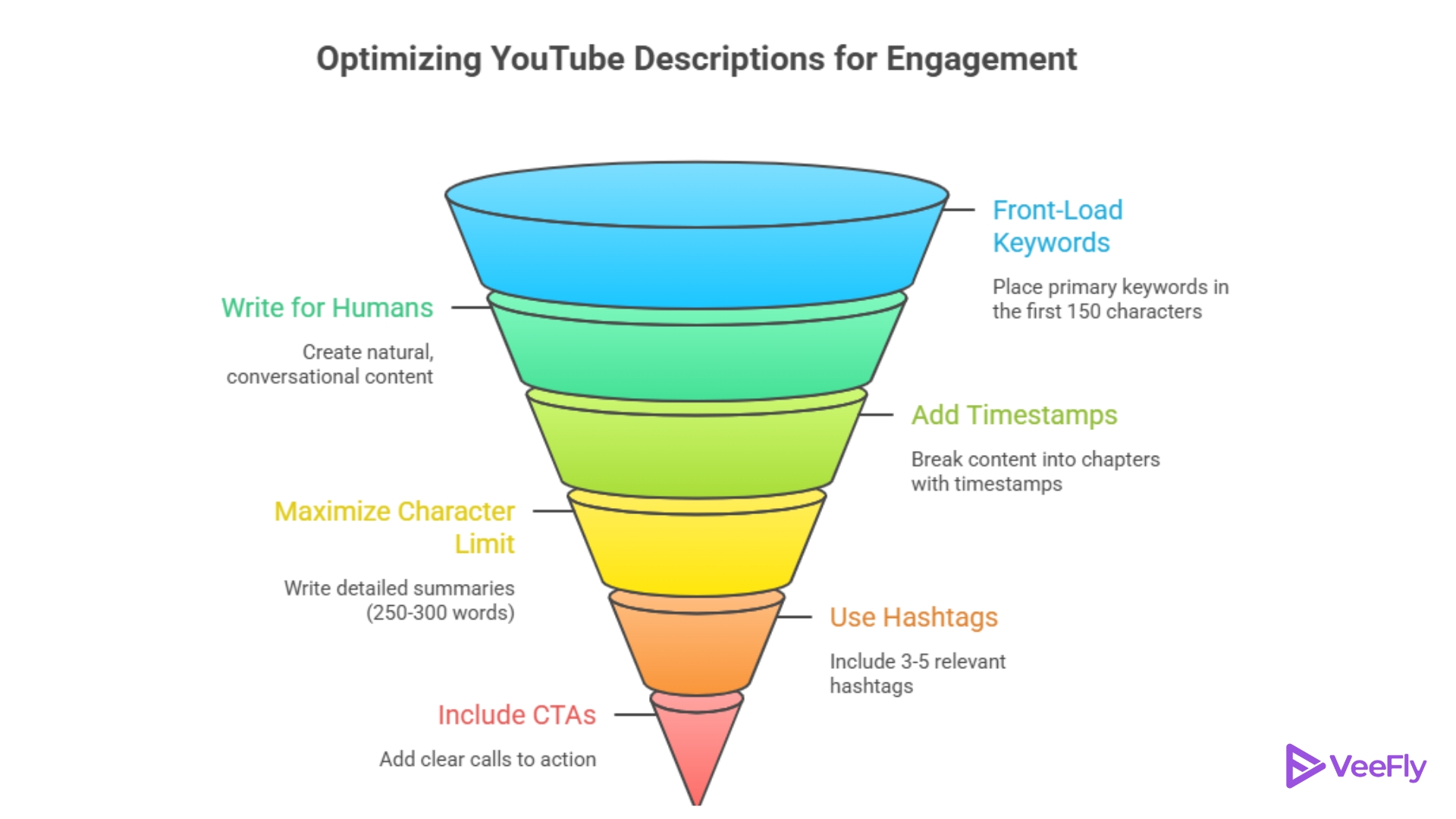
The first two lines of your text are the most critical part of your entire YouTube description. It is the snippet that viewers see before they click the “Show More” button, and it is what appears in search results. You must include your primary keyword naturally within the first 150 characters to immediately signal relevance to both the viewer and the algorithm.
2. Write for Humans, Not Just Algorithms
The days of unthinkingly pasting a block of tags into your YouTube video description are completely over. In fact, doing that today will likely flag your channel as spam. Instead, focus on organic integration. Write a compelling summary of your content that flows naturally. A simple structure that works well here is a short hook in the first two lines, a few bullets covering what the viewer will learn, one main link with a “watch next” suggestion, and chapters if the video runs long.
If your video description sounds robotic when you read it out loud, you need to rewrite it. The algorithm is smart enough to reward conversational, human-written text that provides genuine value to the reader.
3. Add Timestamps to Create Chapters
Have you ever clicked off a video because you couldn’t find the exact information you needed, Your viewers do the same thing. By adding timestamps to your YouTube description, you break your content down into digestible, easy-to-navigate chapters. Not only does this keep your viewers happy and improve retention, but each timestamp is another great opportunity to use long-tail keywords that can rank independently on Google.
4. Maximise the 5,000-character limit
YouTube gives creators a massive 5,000-character limit per upload. While you certainly don’t need to write a novel, writing a detailed summary of at least 250 to 300 words is highly recommended. In practice, most well-performing descriptions land closer to 200 to 500 words, well short of the full cap, since the extra room is there for depth, not something you need to fill entirely. The more context you provide in your video description, the easier it is for the search engine to index your content correctly. Think of it as a mini-blog post that supports your video.
5. Use 3 to 5 Highly Relevant Hashtags
Hashtags are a fantastic way to categorise your content and make it more discoverable. Placing three to five highly relevant hashtags at the very bottom of your YouTube description can help your video appear in trending feeds and topic-specific searches. Worth keeping in mind: your first three hashtags get pulled up and displayed above the title automatically, so it’s smart to lead with your most relevant ones rather than burying them further down the list. However, do not go overboard. If you use more than 15 hashtags, YouTube will completely ignore all of them, defeating the purpose entirely.
6. Include Clear Calls to Action (CTAs)
Your video description is a powerful tool for driving off-platform traffic, but you have to direct it intentionally. Don’t just paste links; tell your viewers exactly what you want them to do. Whether it is “Subscribe for more tutorials,” “Grab my free gear guide here,” or “Follow me on Instagram,” a strong, clear call to action drastically increases your click-through rates.
7. Avoid the “Link Fatigue” Trap
It is incredibly tempting to dump 30 different affiliate links, 5 social media handles, and a Patreon link into every video description. However, this creates what marketers call “link fatigue.” When presented with too many options, viewers are often overwhelmed and end up clicking none. Highlight just one or two primary CTAs per video to keep your audience focused on your main goal.
8. Match Your Title and Thumbnail Context
Your metadata needs to be a cohesive package. If your title promises a tutorial on budget video editing, but your YouTube description is a rambling story about your new expensive camera gear, the algorithm will get confused. A confused algorithm means tanking impressions. Ensure your video description consistently supports and elaborates on the exact topic promised by your title and thumbnail.
9. Create a Repeatable Formatting Template
Nobody wants to read a giant, unformatted wall of text. Since a large portion of your audience is watching on mobile devices, readability is absolutely crucial in your YouTube description. Keep your paragraphs short, no more than two or three sentences each. Use bullet points and spacing to make it skimmable. To save time, create a master template for your channel so you only have to fill in the unique summary and timestamps for each new upload.
It’s tempting to spend just as much effort stuffing your tags field, but tags actually carry very little ranking weight these days. Your title, description, and how viewers actually respond, through clicks and watch time, do far more of the heavy lifting, so a solid description template is worth more than a long tag list.
10. Always Disclose Affiliate Links
If you are using your video description to promote products and earn a commission, transparency is not just good practice; it is legally required in many places. Always include a clear, easy-to-read affiliate disclaimer near your links. Honesty builds immense trust with your audience, and a community that trusts you is far more likely to buy the products you actually recommend.
Do YouTube Shorts Need a Description?
Not in the same way long-form videos do. Shorts have very limited text space and no dedicated description field, so they rely almost entirely on captions and hashtags, according to a 2026 YouTube metadata guide. Since a large and growing share of 2026 content is Shorts-first, the 10 tips above mostly don’t apply here; keep the caption short, lead with the hook since there’s no “Show more” to hide behind, and put your 2 to 3 hashtags directly in that caption rather than a separate description box.
Final Thoughts
At the end of the day, a well-crafted YouTube description is the absolute backbone of your video’s SEO strategy. By applying these 10 tips like front-loading your keywords, adding timestamps, and avoiding link fatigue, you create a powerful metadata package that drives views. Remember that mastering your video description is an ongoing process. Pay close attention to your channel’s analytics to identify which hooks and formatting styles drive engagement, and continually refine your strategy for long-term growth. It’s also worth going back through older uploads every so often; refreshing an outdated statistic, tightening a weak hook, or adding timestamps you skipped the first time around can lift a video that’s already been sitting on your channel.
Along with optimizing your descriptions, explore different ways to promote your YouTube videos to help more people discover your content.
Frequently Asked Questions
Q1)What is the character limit for a YouTube description?
YouTube allows up to 5,000 characters per video description. While you do not need to use every single character, providing a detailed summary of at least 250 words gives the algorithm the vital context it needs to rank and suggest your content properly.
Q2)Do YouTube descriptions really help with video rankings?
Yes, absolutely! The platform uses the text within your YouTube description to understand the context, topic, and overall relevance of your upload. A fully optimized description directly impacts how high you rank in both YouTube’s native search results and broader Google searches.
Q3)How many hashtags should I include in my video description?
The best practice is to include 3 to 5 highly relevant hashtags at the bottom of your text. While you can technically add up to 15, using too many makes your video description look incredibly spammy, and the algorithm may choose to ignore them entirely.
Q4)What part of the video description is the most important?
The first 100 to 150 characters are, without a doubt, the most important. It is the section that appears “above the fold” before viewers click “Show More.” Placing your primary keyword and a compelling hook right here is vital for maximizing both your SEO and your click-through rates.
Q5) Does editing a video’s description after publishing hurt its ranking?
No, and it can actually help. Updating a description, adding missing keywords, refreshing outdated links, or tightening the opening hook doesn’t reset a video’s ranking history. YouTube treats it as ongoing optimization rather than a penalty, which is why refreshing older videos is a legitimate strategy, not a risk.
Q6) Can I reuse the same description across multiple videos?
Not without hurting your channel. Near-identical descriptions across videos can read as low-effort or duplicate content to the algorithm, weakening the relevance signal each individual video needs. A shared template is fine, but the summary and keywords within it should be written fresh for each upload.
Q7) Does the channel “About” section need the same optimisation as video descriptions?
It’s related but not identical. The channel description has a smaller 1,000-character limit and represents your whole channel rather than one video, so it should focus on your broader niche and audience rather than any single video’s keywords.
Q8) Do emojis in a YouTube description affect performance?
Used sparingly, emojis don’t hurt SEO and can improve scannability, especially in bullet-style summaries or timestamp lists. Overusing them, however, can make a description look cluttered or spammy, undermining the “write for humans” approach that ranks better in the first place.
