


Key Takeaways:
- YouTube BrandConnect for brands is a game-changer for both brands and creators.
- Eligible creators connect with genuine brands to access paid opportunities.
- As a result, creators and brands can find sponsorship opportunities more easily.
- Meeting YouTube BrandConnect requirements is essential, including YPP eligibility, age limits, location, and other parameters.
In a win-win situation, YouTube BrandConnect lets genuine brands connect with authentic, influential creators. BrandConnect is a self-service platform that connects creators and brands. By connecting with brands, creators can monetise their content, and brands can reach ideal customers using the creators’ influence. It is a mature, self-service tool that enables direct partnerships for sponsored content. Brands can tap into precise audience targeting through integrated Google Ads data, while creators get more structured opportunities without relying heavily on outreach.
How does YouTube BrandConnect work?
Previously known as Famebit, YouTube revamped the platform into BrandConnect. YouTube aims to connect eligible creators with genuine brands for paid opportunities. Traditionally, creators earn from ad revenue, chat donations, and sponsorships. With YouTube BrandConnect, finding sponsorship opportunities has become seamless for both brands and creators.
BrandConnect offers tools and resources to help you discover each other. Being a self-service platform, creators can upload sponsored content and manage their campaigns directly from YouTube Studio. The tools provide audience insights that will help creators pitch themselves to brands. This will also help brands find creators that align with their niche and target audience.
The platform allows only eligible creators to connect with brands. For example, a creator who is active and has no community guidelines strikes. This helps brands find the right candidates, and creators can easily negotiate deals with brands and manage campaigns for those brands. It is the antidote to what Scott Bedbury famously said: A great brand is a story that’s never completely told.
Why do you use YouTube BrandConnect?
YouTube is a vast platform with billions of users and millions of ads running daily. As a global advertising platform, YouTube has designed BrandConnect to facilitate partnerships between brands and creators.
YouTube has launched many features over the years to support creators. For example, last year’s studio update allowed creators to send their Shorts for brand sponsorships. Although this required back-and-forth communication, it helped small creators. Now, with BrandConnect, the opportunities have increased.
So what is the idea behind YouTube’s BrandConnect platform? In simpler terms, brands gain the creators’ influential presence, and creators earn paid sponsorships through BrandConnect.
How YouTube BrandConnect helps creators
Secured revenue opportunity: Creators can work with brands that match their vibe. They work with products and brands that they are passionate about. BrandConnect makes the opportunity secure, smooth, and reliable.
All-in-one platform: Creators can work with multiple brands, manage deals, negotiate, or run campaigns on one platform. No more email interactions or third-party integrations. All can be done on YouTube Studio.
Value to audience: Since BrandConnect lets you work with brands, you can choose the right fit for your audience and promote relevant, meaningful products.
Showcase Stats: You can share your content stats, including audience insights, to demonstrate your reliability. On BrandConnect, this will help you attract top brands.
How does YouTube BrandConnect help brands?
Finding Top Talent: YouTube BrandConnect for creators assists with matchmaking, data, niche, demographics, performance, etc. Brands can also look for already performing creators or deep insights, such as watch time.
Genuine creators: Many creators use bots or other unethical methods to gain temporary engagement. BrandConnect lets you see analytics, which helps build trust and acquire talent that resonates with the brand.
Campaign Management: The platform has built-in reporting and analytics tools, making it easier for brands to plan, start, and analyse campaigns. Brands can analyse multiple creators in one place.
Reach an active audience: BrandConnect enables creators eligible for the YouTube Partner Program who do not have copyright strikes. This allows brands to connect with active creators who don’t violate community guidelines.
YouTube BrandConnect Requirements for Eligibility
Let’s examine the YouTube BrandConnect eligibility criteria. Meeting these criteria means you can monetise your content, engage with brands, and comply with YouTube’s policies.
Available Locations: YouTube BrandConnect for brands is currently available in only these countries: the United States, the United Kingdom, India, Brazil, Canada, and Indonesia.
Eligible for the YouTube Partner Program: The creator must be enrolled in or eligible for the YouTube Partner Program. That means having at least 1000 subscribers, 4000 watch hours on public videos in the last year, or 10 million Shorts views in the previous 90 days. The creator must also have an active AdSense account and no active strikes.
Following community guidelines: Creators must ensure their content doesn’t violate the YouTube community guidelines. The channel should be strike-free.
No policy violations: The account should not violate policies, such as spam, metric manipulation, or misleading metadata.
Age Limit: The age limit for being a BrandConnect creator is 18 years.
Step-by-Step Process to Start with BrandConnect
If you are eligible for YouTube BrandConnect, here are the steps to follow:
1. Go to YouTube Studio:
After you log in to your YouTube account, go to YouTube Studio. You’ll do most of the management from Studio.
2. Find the Earn section:
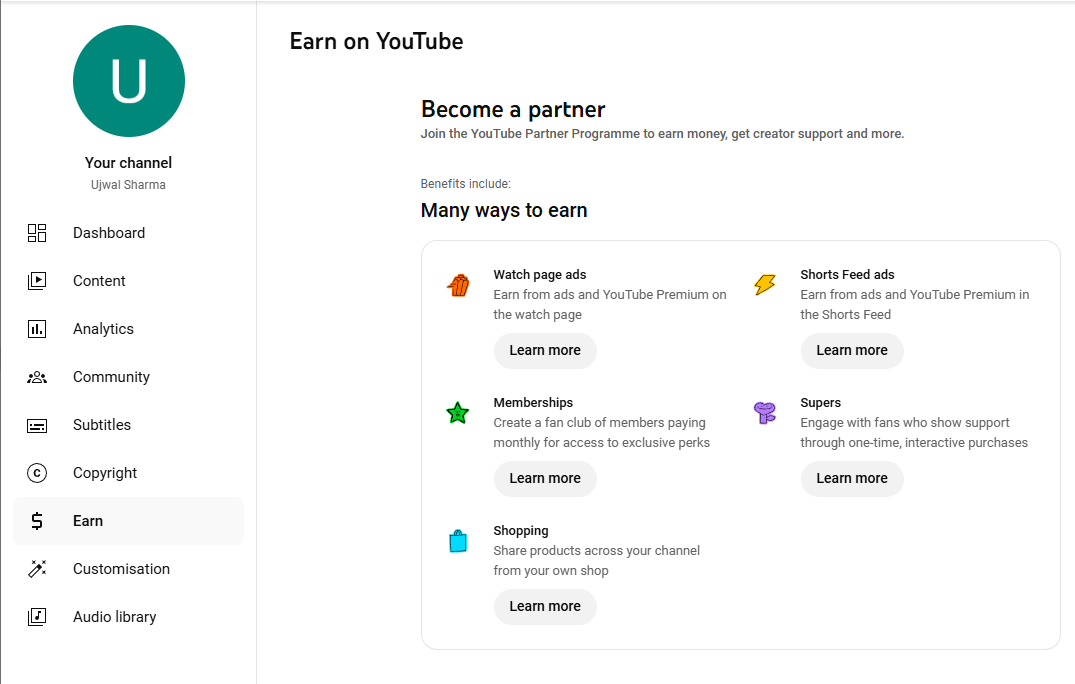
In Studio, you will see “$ Earn” on the left-hand side. Click it; you will see the BrandConnect tab only if you are eligible.
3. Navigate BrandConnect:
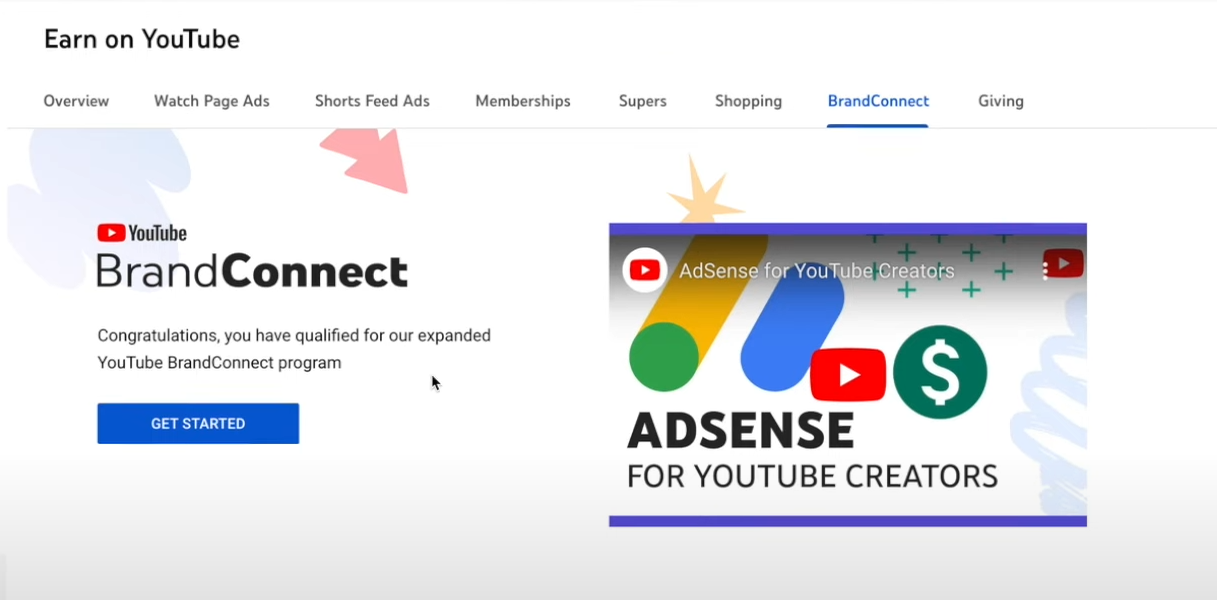
Once you become eligible for BrandConnect, you will see the “Get started” card. Click to proceed. You will be taken to the Terms & Conditions page. Review the terms, and if you agree, you will proceed to the next step.
4. Complete BrandConnect Profile:
Let’s see YouTube BrandConnect requirements for completing the profile.
Contact information: Provide an active email address, phone number, full name, and the channel or company name you use.
Select Categories: Choose the relevant categories or niches for your content.
Social Profile Links: Add links to your social media profiles.
Audience Insights: Provide details of your audience base. Such as demographics and interests.
5. Set your suggested price
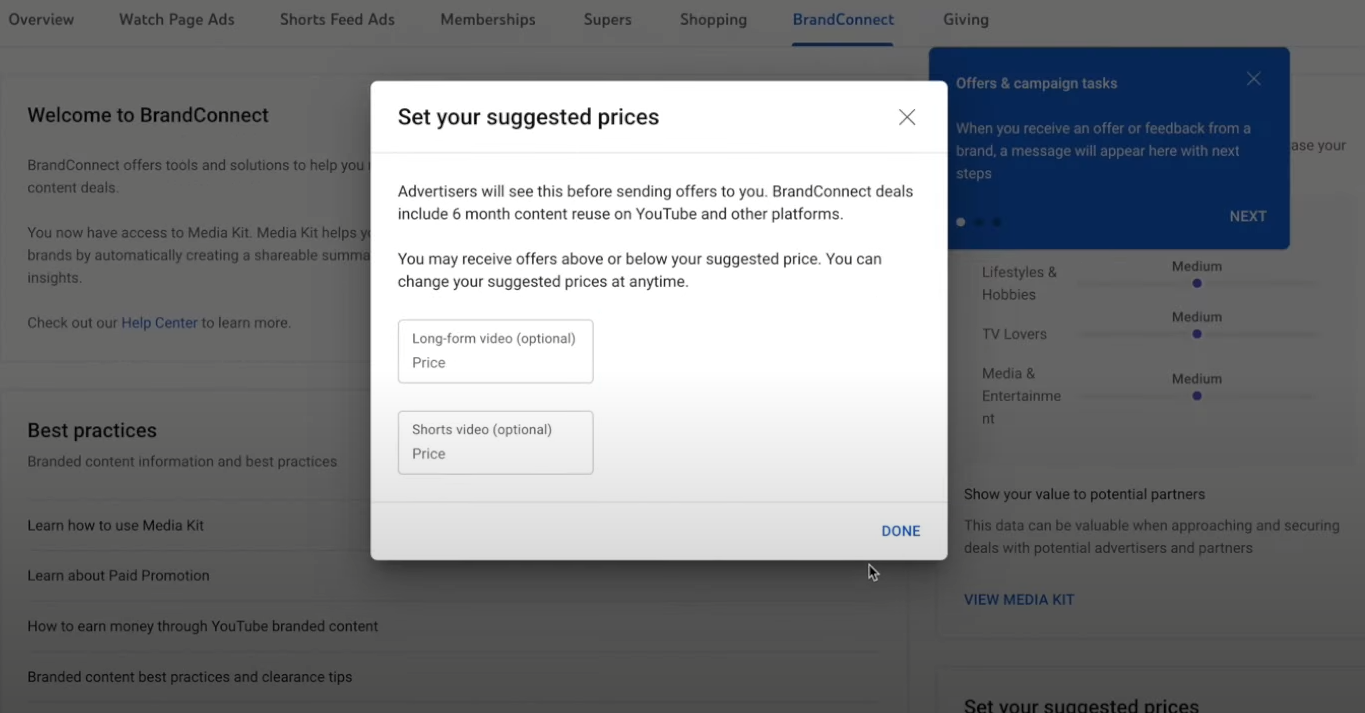
You have set your price for long-form and short-form videos. Brands and advertisers will see this price before sending you offers. Once you have entered the price, click “Done.”
6. Set your availability for brands
You must be available for brands. Set your availability for the campaign and your preferences for the brands or products you like to work with.
7. All done, now look for available campaigns.
Once you have completed your profile, you can look for available campaigns. Filter out campaigns that align with your content or channel.
Now that you’ve set up your profile for YouTube BrandConnect, the next step is to get discovered by brands. Brands browse creators from the media kit. This reflects the creator’s performance and approach.
How to Get Success on YouTube BrandConnect?
To achieve success using YouTube BrandConnect influencer marketing, use the following methods:
Keep your Media Kit Updated: Brands look for creators with a media kit. Update your stats and featured videos often to stay relevant to your target brands. Attract brands with your performance and creativity.
Choose the correct brand: Partner up with brands and companies that provide value to your audience. If your audience doesn’t value the product you are promoting, it can hurt you and affect future brand deals.
Engage the audience: When promoting brands, be transparent with the audience. If they find value, they will look for the product without affecting your engagement. You can integrate products naturally into your content to show creativity and promote them subtly. Get expert promotion help from VeeFly.
Examine Analytics: YouTube BrandConnect has a reporting tool. Examine what’s working for you and what’s not. Adapt the negative results and change your approach to see good results.
What are the Drawbacks of YouTube BrandConnect?
Let’s look at the downfalls of the BrandConnect platform:
High Eligibility: As we have seen, to be part of BrandConnect, you must be part of the YouTube Partner Program, have 25k subscribers, have no strikes, and be on an innovation-only basis.
Dependency on the platform: From managing campaigns to negotiating deals, everything is on the platform, which makes you dependent on it. Any change in the algorithm or terms and conditions will directly impact your creator journey.
Via communication: You will communicate with brands via BrandConnect, which avoids a personal connection with a brand representative and can lead to miscommunication.
Content Control: BrandConnect’s terms and conditions state that advertisers may use your content as an advertising asset. You give Google the right to share your content, including raw files, with advertisers.
How Much Do You Earn From BrandConnect?
YouTube BrandConnect influencer earnings highly depend on the creator and the brand. Several factors determine earnings. These include the following:
- Influencer engagement, audience size, brand positioning in the market, etc. The earnings will heavily depend on how the audience interacts with your content- likes, comments, shares, and watch time- all of which signal value to brands.
- Not all niches pay the same. A YouTube BrandConnect influencer in tech, finance, or education often commands higher rates than general entertainment or vlogs because brands demand them.
- Smart negotiation can significantly increase payouts. Influencers who understand their worth often secure better long-term deals.
- Consistent posting and brand-safe content improve visibility within BrandConnect, leading to higher-paying repeat collaborations over time.
Final Thoughts
YouTube BrandConnect is an evolution in brand collaboration. Eligible creators can streamline their revenue with BrandConnect. The creators and brands can both choose who they want to work with. Brands can find the right influencer by reviewing the creator’s media kit. Creators can find the right brand by viewing ongoing campaigns. This guide breaks down what it takes to be eligible for BrandConnect. It covers the steps to activate your account and, most importantly, the pros and cons of using YouTube BrandConnect. Building a strong audience can help you prepare for future brand partnerships. Learn more about growing your YouTube subscribers as you develop your channel.
Frequently Asked Questions
Q1. Why can’t I access BrandConnect?
You might not see BrandConnect because your channel does not yet meet the eligibility criteria. Other reasons a YouTube BrandConnect influencer cannot access it could include a restricted country or an account not approved for monetisation.
Q2. How much does a BrandConnect account cost on YouTube?
YouTube BrandConnect is free. There are no setup or monthly subscription/upfront fees for using the platform. YouTube monetises the services through a revenue-sharing model, retaining the backend service fee whenever a creator and brand complete a transaction.
Q3. What is YouTube BrandConnect?
YouTube launched a platform called BrandConnect that lets creators find brands and lets brands discover creators. It makes sponsorship opportunities seamless for both parties.
Q4. Can I Join BrandConnect?
Yes, you can join YouTube BrandConnect if you are eligible as per the criteria set by YouTube. You should be at least 18 years old, accepted into the YouTube Partner Program, and eligible for ad revenue sharing. Your channel should also have no active Community Guidelines strikes and adhere to all YouTube monetisation policies.
Q5. How to find a YouTube sponsor?
The channel should be sponsor-ready, create a media kit to showcase your stats, make a pitch, network, connect with agencies, set a price, and close the deal with paperwork.