


Key Takeaways:
- Unique viewers on YouTube is the estimated number of distinct people who watched your videos, counted once per person, regardless of how many times they viewed your videos.
- YouTube tracks both logged-in and logged-out viewers across devices and automatically deduplicates repeat sessions.
- The metric appears in YouTube Analytics under the Audience tab with a 90-day maximum reporting window.
- Use unique viewers to gauge true reach, separate from total views, and identify whether your audience is growing or simply re-watching.
- Low unique viewer counts often result from processing delays or loyal audiences watching multiple videos.
What are unique viewers on YouTube? It’s an estimate of the total number of individual accounts or IP addresses that watched your content during a specified time, regardless of how many times they watched it. This differs from total views, as it shows how many real people watched your channel. Tracking unique viewers alongside watch time, retention, and returning viewers can provide insights into content performance, audience growth, and the overall success of your YouTube strategy.
What Are Unique Viewers On YouTube: Meaning & Analytics Guide
Unique viewers on YouTube is a metric that tells you how many unique people watched your channel in a given time period, no matter how many videos they clicked on or rewatched. Unique viewers on YouTube count each person once, while total views count every watch event, including re-watches and multiple videos viewed by the same person.
| Term | Definition | Counts Each Person |
| Unique Viewers | Number of distinct people who watched your channel in a set period | Once, no matter how many videos or rewatches |
| Total Views | Every single watch event, including re-watches | Multiple times, once per view |
For example, if 25 people watch your channel and collectively generate 100 views in a week, you have 25 unique viewers and 100 total views, giving you an average of 4 views per viewer. Unique YouTube viewers include anyone who watched your content, regardless of whether they were subscribed, signed in, or browsing anonymously. YouTube processes this data in batches, so YouTube Analytics unique viewers typically update with a 48- to 72-hour delay.
For stable comparisons, use weekly or monthly date ranges instead of tracking hour-by-hour changes. Short-term spikes or sudden drops often reflect incomplete data rather than real audience shifts. Note that YouTube limits the reporting period for this metric in YouTube Analytics to 90 days, so if you want long-term historical records, export your CSV files monthly.
Unique Viewers vs. Total Views: Key differences
The key difference between unique viewers and total views comes down to people versus plays:
- Unique viewers are the number of distinct individuals who have accessed your content within a specific period, counting each person only once, regardless of how many times they engage. This metric helps you understand the actual size of your audience and how many different people your content is reaching.
- Total views, on the other hand, count every single instance your content is viewed, including multiple views by the same person. It measures the overall volume of engagement and indicates how often your content is being watched or accessed, reflecting both reach and repeat consumption.
How Does YouTube Calculate Unique Viewers?
YouTube calculates unique viewers for any date range you select in Analytics, up to 90 days maximum. Your monthly audience is the total number of unique viewers over the last 28 days.
A ratio above 3 indicates a core of dedicated fans who come back for multiple uploads, while a ratio under 2 suggests a more general audience with little return traffic, according to studies.
Further, YouTube estimates unique viewers by analysing signals from logged-in accounts, logged-out sessions, device IDs, and IP addresses, then deduplicating them to count each person once. The platform tracks when the same account watches a video on a phone, then later on a laptop, and merges those sessions into a single unique viewer.
Logged-out traffic also contributes to the count, so viewers who browse without signing in still count toward your reach estimate. For YouTube Shorts, the platform derives unique viewers YouTube from engaged views and corresponding watch time rather than counting every impression.
Where To Find Unique Viewer Data In YouTube Analytics
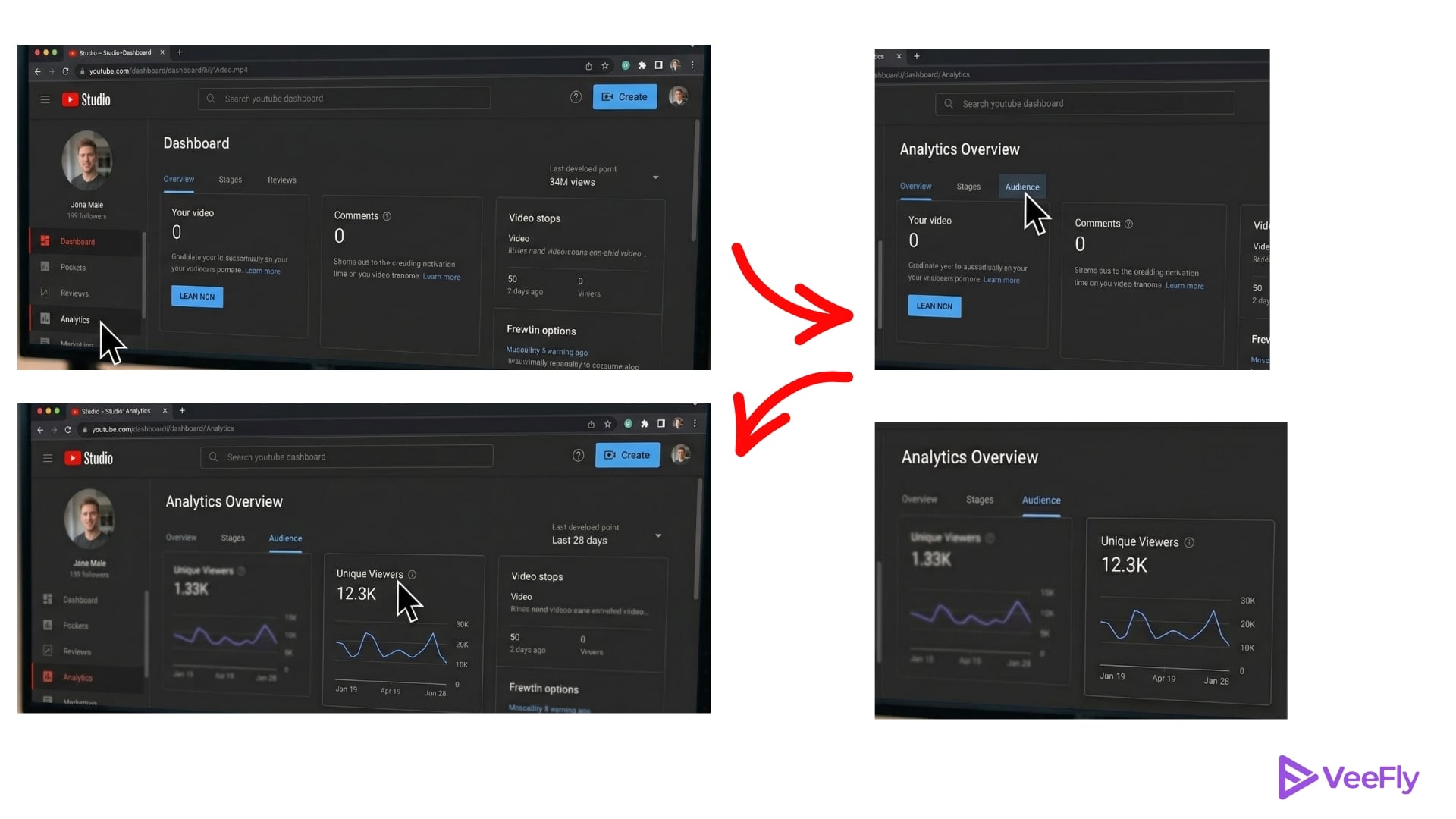
YouTube Analytics unique viewers data lives in YouTube Studio under the Audience tab, accessible through a few simple steps:
- Open YouTube Studio and click Analytics in the left sidebar.
- Select the Audience tab at the top of the Analytics dashboard.
- Scroll to the Unique Viewers card to view your count for the selected date range.
- Click Advanced Mode at the top right to customise columns and add comparison metrics, such as total views or subscribers gained.
- Use the date-range selector in the top-right corner, capped at 90 days, to adjust your analysis window.
- Add comparison columns in Advanced Mode to cross-reference unique viewers with total views and watch time. It reveals whether your reach is expanding or your existing audience is simply watching more content.
- Export your data from Advanced Mode as a CSV file if you need to track trends beyond the 90-day limit.
Why Unique Viewers Matter For Your Channel Strategy?
Unique viewers on YouTube measure audience reach, the total number of distinct people you brought to your channel, while repeat views and watch time measure audience loyalty. Creators negotiating brand deals often present unique viewers as proof of reach, since sponsors pay for exposure to new eyeballs, not just devoted fans re-watching.
Looking at your 28-day unique viewers alongside your subscriber count can show how many of your subscribers are actually watching. Established channels tend to have fewer unique viewers than subscribers because people lose interest, don’t receive notifications, or get logged out. As stated in the YouTube Creator Support Documentation, it’s typical for established channels to have fewer 28-Day Unique Viewers than subscribers, due to inactive accounts, unnotified viewers, and logged-out mobile sessions.
In this scenario, optimise your thumbnails, titles, and first 15 seconds to convert casual clickers into engaged viewers. Low unique viewers with high total views means your loyal audience watches multiple videos or re-watches favourites. Focus on expanding reach through new topics, collaborations, or cross-platform promotion.
Tips To Increase Unique Viewers in 2026
“What does unique viewers mean on YouTube?” In practice, it’s a reach diagnostic that works alongside engagement metrics to shape your content strategy.
- Increasing Unique Viewers means finding new audiences every day while retaining your existing viewers.
- AEO Optimisation: Write your video script in a simple Q&A style so that AI search engines like ChatGPT and Gemini can easily understand and present your content.
- Take Advantage of YouTube Shorts: Shorts can help introduce your channel to new audiences and drive them to your long-form content through cross-format discoverability.
- Partner with Creators: Collaborate with creators in similar niches to use their audiences and gain more exposure.
- Track New vs Returning Viewers: Find out which subjects bring in new viewers in YouTube Studio, then produce more videos on those high-performing topics.
Final Thoughts
Knowing the number of unique viewers on YouTube helps you better understand how well your channel is reaching new people. Total views indicate activity, but unique viewers indicate how large and growing your audience is.
Monitor this metric regularly (alongside audience retention and watch time) in YouTube Analytics, and use the insights to adapt your content strategy. The secret to a consistently growing YouTube channel is to keep bringing new viewers in and keeping your current viewers entertained. Along with tracking unique viewers, think about how you can get your videos in front of a larger audience. You can buy YouTube views to support your video promotion strategy.
Frequently Asked Questions
Q1) Do Private Or Unlisted Videos Count Toward Unique Viewers?
Yes, YouTube Analytics unique viewers include private and unlisted videos when you select “All videos” in your Analytics filter. Change your filter to “Public videos” to exclude private content from your reach totals.
Q2) How Often Is The Unique Viewer Metric Updated In YouTube Analytics?
YouTube processes unique viewers in batches with a typical delay of 48 to 72 hours. Data from the last two days is often incomplete, so use weekly or monthly windows for accurate trend analysis.
Q3) Can Bot Traffic Artificially Inflate Unique Viewer Counts?
YouTube filters known bot traffic before calculating what unique viewers are on YouTube, but sophisticated bot networks may temporarily inflate counts until detected. Sudden spikes that disappear within days usually indicate filtered bot sessions.
Q4) Why Are My Unique Viewers Lower Than My Subscriber Count?
Many subscribers browse while logged out, stay inactive for months, or skip videos that don’t interest them. Your 28-day unique viewers reflect only those who watched during that window, whereas your subscriber total accumulates over time.
Q5) Does Watching Your Own Video Count As A Unique Viewer?
Yes, you count as one unique viewer if you watch your own content while logged into your creator account. Your single view does not meaningfully skew the totals for channels with established audiences.
Q6) Are Unique Viewers The Same Metric As Unique Reach In YouTube Studio?
No. Unique viewers are an estimate of the number of unique individual accounts or users who have watched your channel content within a specific period. Unique Reach is also an advertising metric in Google Ads and YouTube Studio for campaign reporting, and it estimates how many unique users saw your ads on shared household devices.