


Key Takeaways:
- YouTube exclusively supports the Creative Commons Attribution (CC BY) license.
- The ‘Filter’ tool is the primary way to locate CC material in the platform search.
- Creative Commons allows for commercial reuse, unlike the Standard YouTube License.
- Attribution is a legal requirement whenever you reuse Creative Commons YouTube content.
- You cannot apply a CC license to a video with a Content ID copyright claim.
The standard YouTube license and the Creative Commons framework dictate how creators legally reuse content. By default, YouTube reserves all rights under the standard YouTube license; the Creative Commons Attribution (CC BY 4.0) License allows anyone to reuse, edit, and monetise the content for any purpose on any YouTube channel, with attribution to the creator in the description.
For video licensing, your channel will be 100% protected from copyright strikes. If you want to remix a video that you’ve seen on YouTube, or if you want to share your music with others, you’ll have to decide which of the two licenses you have is the one you want to use. This guide explains how to use Creative Commons YouTube content safely within the current copyright policies of YouTube.
What is the Creative Commons License on YouTube?
The Creative Commons license in the YouTube ecosystem lets creators give permission for anyone, anywhere in the world, to reuse, edit, and distribute their videos. YouTube only includes the Creative Commons Attribution (CC BY 4.0) framework, which allows reusers to attribute the original creator but not for commercial purposes. When you use CC BY, you grant non-exclusive rights to the work while retaining the rights to the original work.
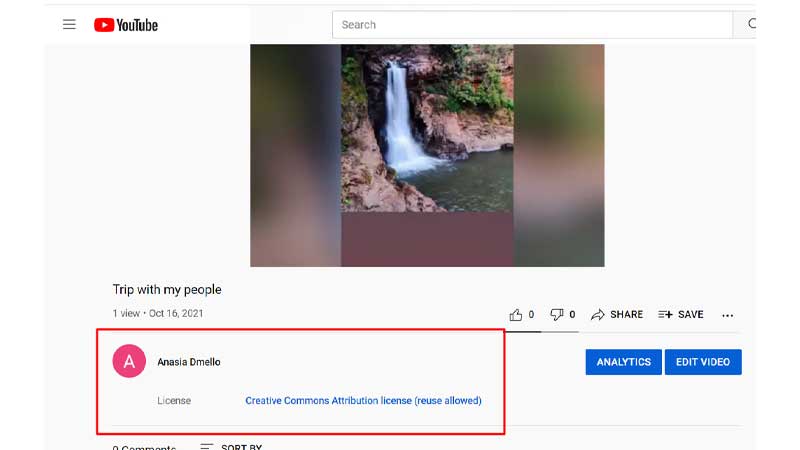
What is the eligibility for Creative Commons attribution on YouTube?
Below are the criteria or eligibility that you need to fulfil for Creative Commons Attribution YT:
- Your content should be original and solely created by you.
- Other videos should also be marked with a CC license.
- Finally, your videos should be in the public domain.
What is YouTube Creative Commons Music?
Creative Commons allows free, copyright-free license marks that will enable you, as a content creator, to allow others to use your content. Promote video on YouTube with a Creative Commons License and let your work inspire other creators while expanding your channel’s reach. For instance, if you are a musician and use YouTube Creative Commons music, you can let people legally use your music in videos, remixes, and copies for their friends.
Many artists release their songs under the YouTube Creative Commons music license, allowing people to use the pieces to make videos.
How to find YouTube Creative Commons Videos?
Creative Commons YouTube audio track licensing lets musicians and independent creators release music without paying royalties for video remixes and background music in public videos. When others credit your work, you can use Creative Commons YouTube music to reach more people. When adding third-party audio tracks to your video edits, ensure that they have no third-party Content ID claims.
1. First, open YouTube in your browser.
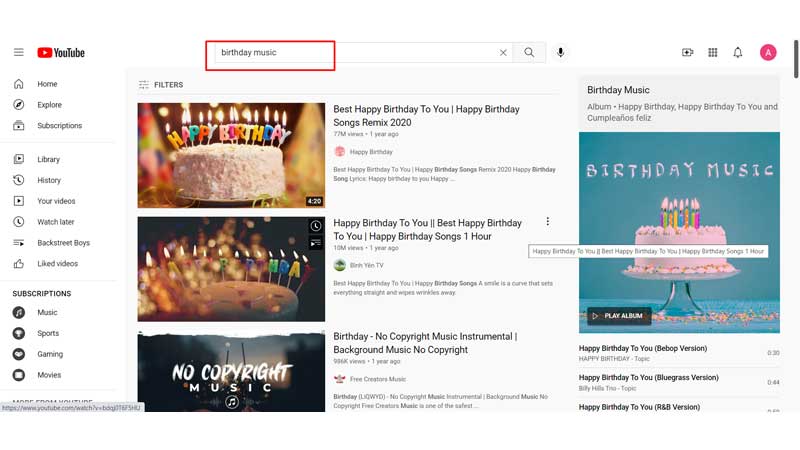
2. Then, enter the term for any music or video you want in the search bar on YouTube. For example, search for birthday music with a YouTube Creative Commons license.
3. Click on “Filters.”
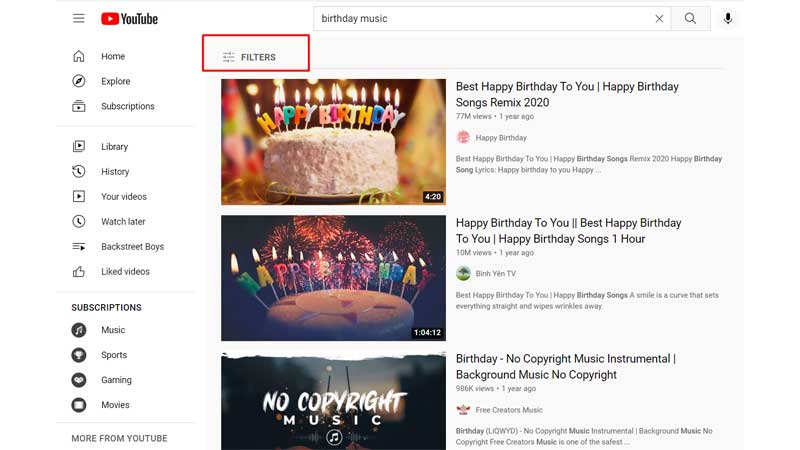
4. In the filter options, you need to click on ‘Creative Commons.’
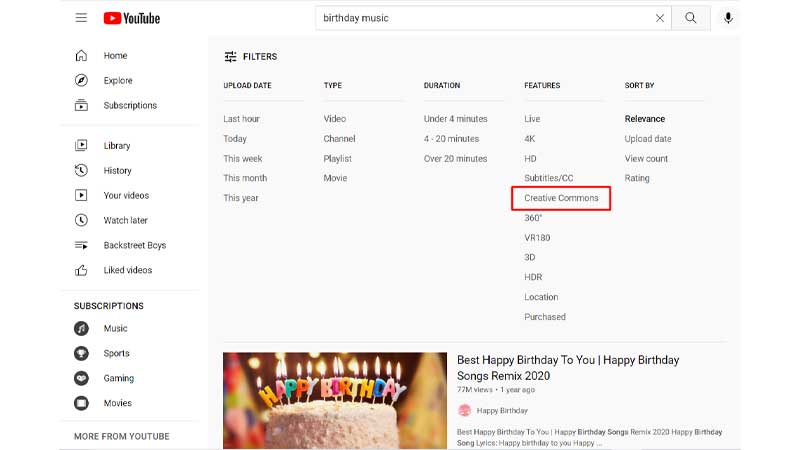
Now, you can use these YouTube Creative Commons videos to make your own videos and remixes.
Standard YouTube License vs Creative Commons
The issue of whether it should be the standard YouTube license vs Creative Commons is one of distribution control versus audience sharing. YouTube’s default setting is the standard YouTube license, which grants rights to broadcast the content only on YouTube and severely restricts public reproduction. On the other hand, a Creative Commons YouTube setting grants worldwide rights to edit, remix, and share your video, with required attribution to the creator.
Let’s now compare the two main licensing frameworks from an operational rights perspective:
| Feature | Standard YouTube License | Creative Commons (CC BY) |
| Default Option | Yes (will be applied automatically when you upload) | No (must be set in Studio settings) |
| Public Reuse Allowed | No (absolutely not without prior written permission) | Yes (free to use with credit) |
| Commercial Monetization | Original owner only | Yes (allowed for transformative re-uses) |
| Distribution Rights | Only available on the YouTube platform. | Non-exclusive global sharing |
| Attribution Required | N/A | Mandatory (TASL Method) |
Can You Monetize Content with a Creative Commons License on YouTube?
YouTube Partner Program policies allow videos that include Creative Commons licensed YouTube content to be monetised as long as the content is meaningfully transformative. YouTube’s Reused Content policies prohibit re-uploading a video that lacks original commentary, unique editing, or original value. If you re-upload a video without original commentary, unique editing, or original value, it will be subject to YouTube’s Reused Content policies and will be removed from monetisation. Provide meaningful original content or educational analysis whenever possible to keep your channel in good standing.
How to Properly Attribute CC Creators?
To stay legally safe when using a Creative Commons license YouTube video, you must follow the TASL method:
- Title: The name of the video.
- Author: The name of the creator (and a link to their channel).
- Source: The URL of the original video.
- License: A link to the CC BY license terms.
Final Thoughts
We hope you now know everything about the Creative Commons License on YouTube, so you can use it to your advantage while you build exposure on YouTube. Along with using Creative Commons content correctly, focus on creating videos that attract more viewers. You can also explore YouTube view promotion to reach a wider audience.
Frequently Asked Questions
Q1. Can I use Creative Commons license images in YouTube?
Yes, you can legally use Creative Commons licensed images on YouTube from sites such as Wikimedia Commons or Flickr in YouTube videos. Clear attribution is required in the description and must include the artist, title, source, and link to the Creative Commons YouTube license.
Q2. How do I reuse a Creative Commons video on YouTube?
To set a Creative Commons license on YouTube, go to YouTube Studio, choose your video, click on Advanced settings, then click on License, and set it to Creative Commons – Attribution.
Q3. Can a creator revoke a Creative Commons license on YouTube?
Creators can change a video’s license back to Standard at any time; however, the CC BY license granted prior to the change remains permanently valid for users who sourced it during that window.
Q4. What happens if I forget to attribute a Creative Commons video?
If you don’t provide proper TASL attribution, your video may be subject to copyright infringement, Content ID claims or a formal DMCA takedown notice by the video owner.
